Before you propose a trade allowance, bring the vehicle’s condition estimates and supporting asking prices together. This used car trade-in appraisal worksheet from Car Dealer Sheets gives you a structured Excel record for explaining how you reached your proposal.
Enter your appraisal details and manually supplied market comparables, then review the calculated allowance and proposal variance. The workbook provides arithmetic support, not an automated valuation; you still decide whether the evidence and proposed amount are appropriate.
When to use this workbook
- Keep condition notes and prep deductions beside the proposed trade allowance so you can explain the decision.
- See whether enough usable comparable observations support the calculation under your chosen minimum.
- Separate estimated prep costs from a discretionary acquisition cushion.
- Identify proposals that differ from the calculated indication and decide what needs further review.
What is in the file
How to use the workbook
1. Set your appraisal assumptions
On Assumptions, review Planning reserve (USD), Variance review threshold (USD), and Minimum usable comparables in B2:B4. The supplied values are fictional examples, not recommended dealership settings. Confirm that Assumption check shows Valid before using the indication.
2. Enter the vehicle being considered
Replace or clear the fictional DEMO input records without deleting formulas. On Trade Appraisals, enter a unique Stock reference, Appraisal date, Vehicle description, and Odometer (miles). Use MM/DD/YYYY dates and whole miles. Enter the appearance, tire, and other prep estimates in USD, with Condition and rationale notes explaining the estimates.
3. Record supporting observations
On Market Comparables, use the same Stock reference for each observation. Enter its source, observation date, vehicle description, mileage, asking price, and Comparability rationale. Supply enough complete observations to meet your minimum; a zero asking price does not count as usable.
4. Enter and assess your proposal
Return to Trade Appraisals and check the usable count, mean asking price, total prep, reserve, and indicated allowance. Enter Proposed trade allowance (USD), then read Proposal variance (USD) and Review status. Explain any decision to depart from the indication in your notes.
5. Check the record before relying on it
Compare the entries with your condition observations and source listings. Edit only the cream input cells; the gray calculated cells are unprotected. Check the displayed calculations in your spreadsheet application before using the record to support a buying decision.
Choose comparables that support the buying decision
A comparable contributes its asking price only when its reference matches exactly one appraisal and its required details are present: source, date, vehicle description, mileage, positive numeric asking price, and rationale. Use Source description to identify where you obtained the observation and Comparability rationale to explain why it is relevant.
Usable does not mean verified or well matched. The eligibility formula checks recorded inputs; it does not assess whether a different trim, condition, mileage, or observation date makes the vehicle a suitable comparison. Review those differences yourself before relying on the mean.
The mean gives each usable observation equal weight. Mileage and dates provide context but do not automatically adjust prices or exclude old listings. Comparable asking prices are also not agreed sale prices. If one observation pulls the average away from the others, inspect its source and relevance rather than treating the average as a confirmed market value.
Separate prep deductions from the planning reserve
The workbook adds Appearance prep estimate (USD), Tire prep estimate (USD), and Other prep estimate (USD) to produce Total estimated prep (USD). All three entries must be numeric and nonnegative for that total to calculate. Enter an explicit zero when you have assessed a category and estimate no deduction; leaving it blank means the total remains incomplete.
Use Condition and rationale notes to connect the amounts to what you observed. These are planning deductions, not safety diagnoses, repair orders, or actual invoices. If an estimate is uncertain, describe that uncertainty and decide whether you need more information before proposing an allowance.
The Planning reserve (USD) is a separate discretionary acquisition cushion, not another prep invoice. It comes from Assumptions and applies across the appraisal records. Avoid counting the same concern in both prep and reserve without explaining why. The indication subtracts only the recorded prep total and reserve; do not assume it includes other acquisition costs or produces an expected profit.
Example: from asking prices to a proposed allowance
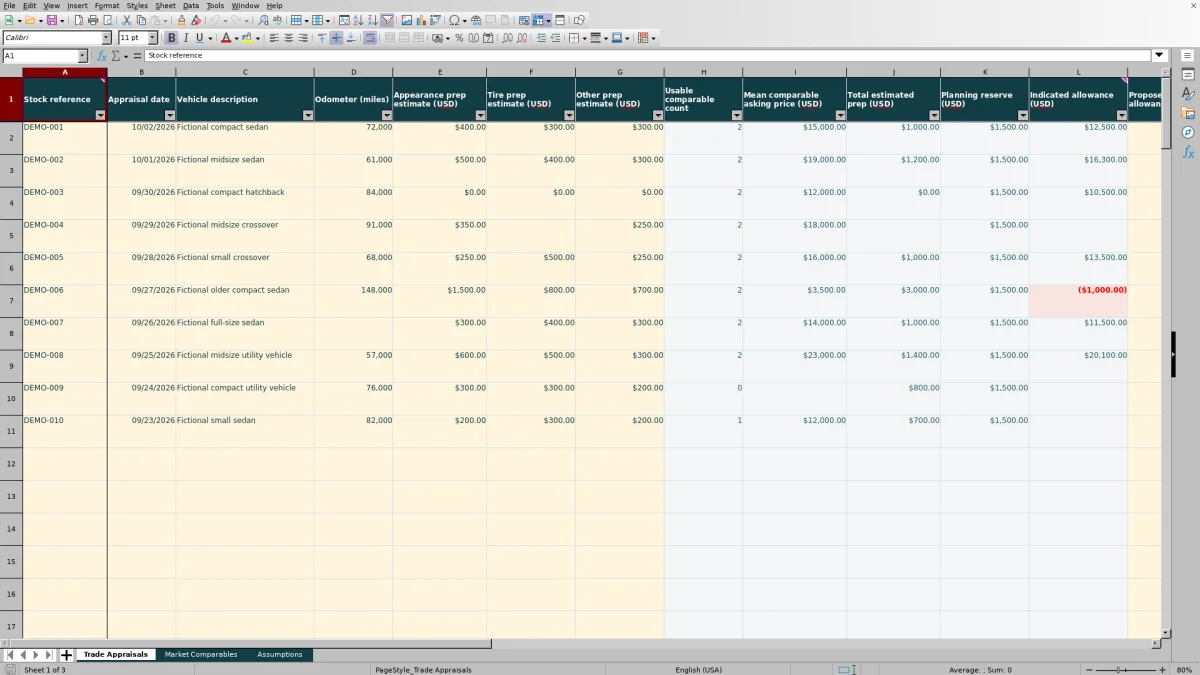
The workbook’s fictional DEMO-001 example describes a compact sedan with 72,000 miles appraised on 10/02/2026. Two fictional comparable observations, also dated 10/02/2026, have asking prices of $14,000 and $16,000 USD. Their arithmetic mean is $15,000 USD, and the two usable observations meet the example minimum of two.
Appearance prep of $400, tire prep of $300, and other prep of $300 total $1,000 USD. With the fictional $1,500 USD planning reserve, the indicated allowance is $15,000 − $1,000 − $1,500 = $12,500 USD. This is the asking-price mean after the two recorded deductions, not a verified purchase value.
The proposed allowance is $13,000 USD, so the proposal variance is $13,000 − $12,500 = positive $500 USD. You would therefore be proposing $500 above the indication. Before proceeding, decide whether your evidence supports that difference and record the reason. Under the example $500 review threshold, equality does not trigger the variance review rule; it still does not establish that the proposal is appropriate.
Use the variance to focus your review
Proposal variance (USD) subtracts Indicated allowance (USD) from Proposed trade allowance (USD). A positive result means your proposal is above the indication; a negative result means it is below. The sign tells you the direction, while the absolute amount tells you the size of the departure.
The Variance review threshold (USD) applies to departures in either direction. Review is triggered when the absolute variance exceeds the threshold, not when it merely equals it. Use that rule to identify records needing explanation, not as permission to accept every proposal within the threshold.
Ready for review means administratively complete only. It is not an approval, inspection result, or endorsement of the amount. Also remember that the assumptions are shared: changing the reserve changes existing indications, changing the threshold can affect review statuses, and increasing the minimum comparable count can leave existing indications blank. Recheck affected records after an assumption change.
Problems and fixes when a result is missing
- Blank indicated allowance: Check Assumption check first, then the usable comparable count and all three prep entries. An invalid or missing assumption, too few usable comparables, or an incomplete prep total can suppress the indication. A blank is not a zero-dollar allowance.
- Duplicate reference: Give each appraisal its own unique Stock reference and correct the linked observations. A comparable must match exactly one appraisal to contribute its price.
- A comparable is not counted: Check every required input on Market Comparables and confirm that Asking price (USD) is numeric and greater than zero. Look at Usable asking price (USD), rather than assuming a completed-looking row has been included.
- Needs input: Check the appraisal date, vehicle description, whole-mile odometer entry, prep estimates, and Condition and rationale notes. Validation permits blanks while you draft.
- Blank proposal variance: Confirm that the indicated allowance is present and that Proposed trade allowance (USD) contains a number.
- Calculation error or Review calculation: Recheck the linked source entries and calculated cells before relying on the record. Do not replace an error with an assumed allowance.
Pasting can bypass spreadsheet validation. Review pasted dates, mileage, prices, references, and notes even if the workbook displays a numeric result. The formula checks do not verify the underlying observations.
Keep the worksheet within its buying role
Each appraisal row represents a vehicle considered for acquisition, not a vehicle already held in retail stock. A proposed trade allowance is not an offer, receipt, payment, expected funds, or settled funds. Use your separate deal records for any agreed transaction.
The workbook does not provide valuation feeds, vehicle identification number (VIN) decoding, integrations, synchronization, messages, payments, or macros. You supply and maintain the comparable observations. It also does not manage retail inventory, financing, consumer lending, handover, repair-shop work, tax determination, or legal decisions.
The workbook’s documented generation checks cover formula placement and reference arithmetic, but do not evaluate Excel formulas. Verify displayed results before relying on them. Keep a dated copy of an appraisal when you need to retain the assumptions and evidence used for a particular decision; the live formulas depend on the current entries and shared settings.
Compare this workbook with a blank spreadsheet
Choose according to how closely your appraisal process fits the supplied calculation. This workbook gives you a defined structure for manually supported trade appraisals. A blank spreadsheet lets you design a different structure, but you must build and check the calculations and input checks yourself.
| Method | Starting structure | Calculation approach | Evidence and checks | When to choose it |
|---|---|---|---|---|
| This appraisal workbook | Prepared appraisal, comparable, and assumption sheets | Mean asking price less prep and reserve, with proposal variance | Source and rationale fields, eligibility checks, and review statuses | Your process fits this arithmetic and you supply the observations manually |
| Blank spreadsheet | You create the layout and record links | You design and check the formulas | You decide which evidence fields and checks to build | You need a different appraisal structure and can maintain it |
If you need connected dealership workflows or external valuation data, evaluate specialized dealer management software against those requirements separately. This workbook does not provide those functions, and a field for recording a source is not an integration with that source.
Frequently asked questions
Can I use my stock number as the appraisal reference?
Yes, you can enter your chosen identifier in Stock reference, provided it is unique within Trade Appraisals. Repeat that reference on every related Market Comparables row. The reference links the records; it does not mean the vehicle has been acquired or added to retail stock.
How many appraisals and comparables can I enter?
The prepared ranges are rows 2–101 on Trade Appraisals and rows 2–301 on Market Comparables: 100 appraisal records and 300 observations in total. The 300 observations are shared across all appraisals, not available separately for each one. Do not assume entries outside those ranges are included in the formulas.
Does the workbook automatically find current asking prices?
No. You enter the sources, observation dates, vehicle details, asking prices, and rationale manually. There is no automated valuation feed or listing synchronization. Recheck the sources when you need current evidence for a proposal.
Is the indicated allowance a suggested retail asking price?
No. It is an acquisition-planning calculation: the mean usable comparable asking price minus your total estimated prep and planning reserve. It is separate from your proposed trade allowance and does not establish a retail asking price or an agreed sale price.
Should I keep the DEMO records and supplied assumptions?
The DEMO vehicles, observations, amounts, mileage, notes, and supplied planning assumptions are fictional. You can use them to understand the arithmetic, then replace or clear their input cells before working with real appraisals. Preserve the calculated cells and choose assumptions that reflect the decision you are making rather than treating the example settings as recommendations.
Editorial areas

Owen AshfordVehicle stock & purchasing
About this editorial area →
Mara WestbrookSales records & delivery
About this editorial area →