When purchasing passes an accepted used car to stock staff, record what actually changes hands: the vehicle reference, keys, document packet and known issues. This Car Dealer Sheets Excel workbook gives you a used car acquisition handover checklist with receiving acknowledgement and a summary of handovers needing attention.
Use one record for each accepted, owned-vehicle acquisition handover. The workbook tracks the paperwork transfer after purchase acceptance; it is not buyer due diligence, consignment intake or a check of legal title or roadworthiness.
When to use this workbook
- Give receiving staff a single record of the expected and delivered handover items.
- Keep shortages and known issues visible alongside the receiving acknowledgement.
- Prioritize unacknowledged handovers using a review date and follow-up threshold you set.
- Review status totals without manually counting each handover row.
What is in the file
How to use the workbook
1. Set up your review
In Settings, change Review date in B2 to the date of your review and check Follow-up threshold (days) in B3. The supplied threshold is 3 calendar days and is an operational preference, not a legal deadline. Handover rows 2–11 contain fictional examples. Clear or replace their input values before using the summary for your dealership, while preserving the formulas in columns O:R.
2. Identify the accepted acquisition
In Handover, enter a unique stock number as text in Stock reference first. Add the vehicle description, purchase acceptance and physical handover dates, and purchasing and receiving staff initials. Use MM/DD/YYYY for dates. The cream cells are editable; prepared entry rows run from 2 through 101.
3. Reconcile what was delivered
Enter expected and delivered key counts, then list the expected and received document items. Select Document review as Complete, Exception or Pending based on your packet review. Record known issues and explain any discrepancy in Exception notes. Use the workbook’s standard no-issue entries only when they accurately describe the handover.
4. Record acknowledgement and review open work
Enter Receiving acknowledgement date only after the receiving clerk acknowledges the recorded handover and its exceptions. Let the workbook recalculate, then filter Handover status or Follow-up to review outstanding work. Check Summary for status totals and the reconciliation result. Acknowledgement is not resolution, so continue managing any unresolved exception even when its handover stops appearing in the follow-up count.
Make the receiving record specific enough to act on
Start with the stock number so the receiving clerk can connect the handover to the right accepted acquisition. Use Vehicle description to help identify the car, then compare the keys and packet in front of you with what purchasing expected to deliver.
Expected documents and Received documents are text lists, not an automated document comparison. List packet items rather than sensitive document contents. If an expected item is missing, record what actually arrived and select the appropriate Document review choice; the workbook cannot infer a shortage from differences between the two lists.
Complete is your recorded packet-review choice, not a finding that the documents establish legal title. When you select Exception, explain the discrepancy in Exception notes so the receiving clerk knows what is being acknowledged. Keep supporting paperwork available outside this register for the checks your dealership needs to perform.
Read handover status as a sequence of checks
Handover status helps you decide what to do next. It checks missing inputs before treating the record as an acknowledged transfer, so one issue can mask a later-stage status until you correct it.
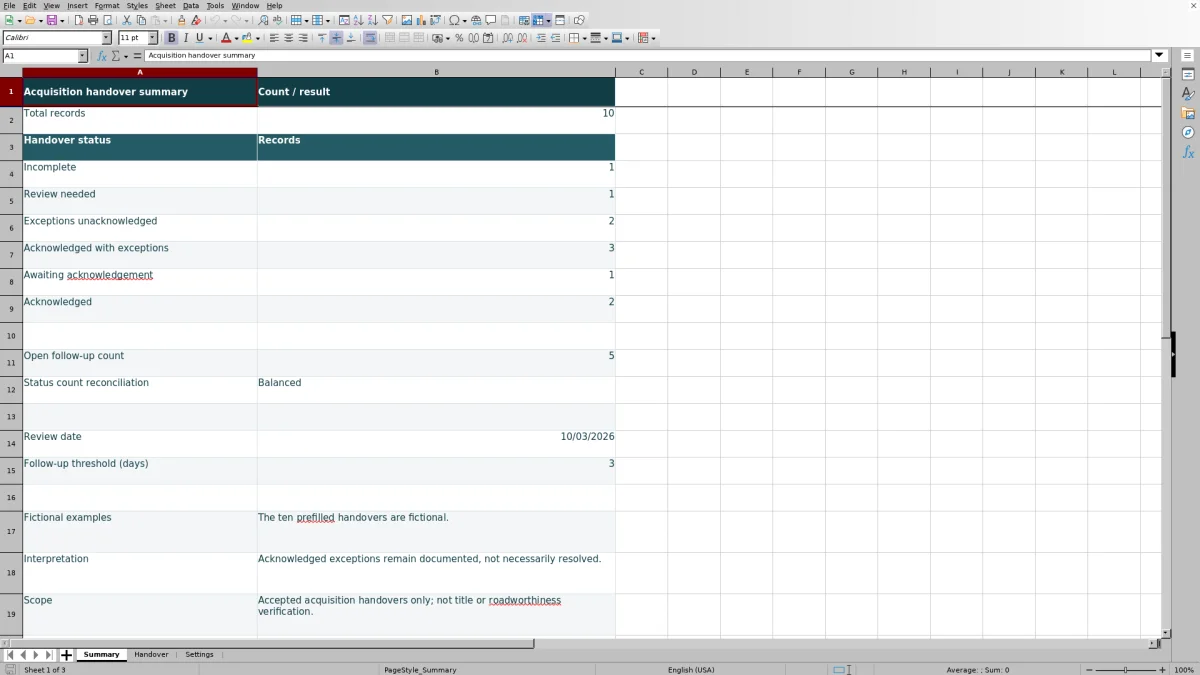
- Incomplete: fill the missing required handover details before interpreting the record as a completed transfer.
- Review needed: Document review is blank or Pending. Review the packet and record the appropriate choice.
- Exceptions unacknowledged: a discrepancy or issue is present, but the exception documentation or receiving acknowledgement is still missing.
- Acknowledged with exceptions: the exception is documented and the receiving acknowledgement is recorded. Decide separately who will resolve the outstanding item.
- Awaiting acknowledgement: the otherwise completed record still needs a receiving acknowledgement date.
- Acknowledged: the recorded handover has reached acknowledgement without a recorded exception.
Both extra and missing keys count as discrepancies. Reported issues other than None reported, or Exception notes other than None, also put the record on the exception path. A date in Receiving acknowledgement date does not substitute for an explanation of an exception.
Example: one missing key, acknowledged but unresolved
In the workbook’s fictional FICTION-002 example, purchasing expected 2 keys and receiving staff recorded 1 delivered key. Key variance subtracts expected keys from delivered keys: 1 − 2 = −1 key. The negative result means one expected key was not handed over; it does not tell you where that key is.
The record lists a complete document packet, reports no other issues and includes the note “One key short; shortage acknowledged, still unresolved.” With a receiving acknowledgement date of 10/01/2026, the status becomes Acknowledged with exceptions.
Your next decision is how to deal with the missing key, not whether the handover was acknowledged. The shortage remains unresolved even though Open age (days) and Follow-up become blank for that acknowledged record. If you use a separate action log, carry the missing-key task there rather than relying on the open follow-up count to keep it visible.
A positive variance also needs review. For example, 3 delivered keys against 2 expected gives +1 key. Reconcile the extra key and document the exception rather than assuming any nonnegative result is satisfactory.
Use the review date to prioritize unacknowledged handovers
Open age (days) measures calendar days from Purchase accepted date to the Review date in Settings, not from the physical handover date. The calculation is floored at zero. Follow-up shows Follow up when that age is at least the selected threshold; otherwise it shows Within target.
For a fictional unacknowledged handover accepted on 09/28/2026, a review date of 10/03/2026 produces an open age of 5 calendar days. With a threshold of 3 days, it is flagged Follow up. Use that result to contact the people involved and identify whether the delay is missing information, packet review or receiving acknowledgement.
Update the review date for each review; it is an editable setting, not a live clock. Acknowledged and Acknowledged with exceptions records have blank age and follow-up results. The Summary open follow-up count therefore measures aging, unacknowledged handovers—not every unresolved key, document or vehicle issue.
Fix missing records, misleading counts and input errors
If you have entered vehicle details but see no calculated result, check Stock reference first. A blank reference leaves the calculated cells blank, and the summary’s Total records counts populated references in Handover rows 2–101. Orphan inputs—details entered without a stock reference—are highlighted for correction.
The stock-reference entry rule calls for unique text. Resolve duplicate references against your actual records rather than simply changing a stock number to silence a warning. Excel entry rules can be bypassed by pasted data, so check pasted rows for duplicate references, invalid dates and inconsistent review labels.
Summary shows Balanced when the six status counts add up to Total records. Balanced is a count check, not proof that every entry is correct or that every acquisition has been entered. If it shows Review status counts, check for overwritten status formulas and confirm that the workbook has recalculated.
Keep ordinary data entry in columns A:N and preserve formula columns O:R. The prepared capacity and summary ranges end at row 101. Do not assume an entry on row 102 will receive formulas, validation or summary coverage; any expansion needs its ranges and calculations checked before you rely on it.
Keep the checklist within the acquisition handover process
This workbook records the transfer of an already accepted, owned-vehicle acquisition from purchasing to receiving staff. It does not decide whether you should buy the car, verify legal title, certify roadworthiness or diagnose safety issues. Consignment intake is outside its stated scope.
A reported issue can be carried into the receiving record, but the file is not a prep-work or repair-shop job manager. Likewise, acknowledgement does not establish that a car is ready for retail sale. Use the relevant inspection, prep and stock-control processes before making that decision.
Receiving staff initials and an acknowledgement date document what you enter. Do not treat the status alone as independent proof of the physical transfer. Where an exception needs continuing action, keep the supporting evidence and a separate resolution record appropriate to your dealership’s process.
Compare the workbook with a blank spreadsheet or paper log
Choose a method based on how you need to record transfers and review outstanding work. This workbook provides a defined handover structure and calculations, but it also requires consistent entries, current settings and attention to its 100-record prepared range.
| Method | Recording the transfer | Status and follow-up review | Setup and limits |
|---|---|---|---|
| This workbook | Prepared fields for keys, packets, issues, staff and acknowledgement | Calculated status, age, follow-up flags and summary counts | 100 prepared records; requires accurate entries, recalculation and an updated review date |
| Blank spreadsheet | You choose the columns and wording | You must create calculations or review records manually | Flexible layout, but you must build and check the structure |
| Paper log | Staff write the transfer details and exceptions | Staff manually find open records and count outstanding handovers | No workbook setup, but pages must be kept organized and available for review |
Use this workbook when its defined acceptance-to-acknowledgement process matches your task. A blank spreadsheet may suit a substantially different internal register if you can build and maintain it. A paper log may suit a simple physical handover desk where manual review is sufficient. If you need a connected process beyond handover paperwork, assess specialized dealer management software against those requirements rather than assuming this workbook provides that connection.
Frequently asked questions
What should I enter when no keys or documents arrive?
Record the actual delivered key count, including 0 when no keys arrive; do not leave it blank to mean zero. Use None received in Received documents when appropriate. Review the result against the expected items, select the appropriate Document review choice and explain any shortage in Exception notes. None reported in Reported issues and None in Exception notes should only be used when they accurately describe the handover.
Why might a handover or acknowledgement date be rejected?
The date rules require valid whole-date values. Purchase accepted date cannot be later than Review date. Physical handover date must be on or after purchase acceptance and no later than Review date. Receiving acknowledgement date must be on or after physical handover and no later than Review date. Check Settings first if you are entering a recent transfer against an old review date, then enter dates in MM/DD/YYYY format.
Can I rename the document-review choices?
Keep Complete, Exception and Pending in Settings D2:D4. The formulas use those exact labels. Put extra explanation in Exception notes rather than replacing the choices with your own status wording.
Do receiving staff initials count as acknowledgement?
No. Receiving staff initials identify the staff entry, while Receiving acknowledgement date is the separate input used to record acknowledgement. Enter that date only after the receiving clerk acknowledges the handover and any recorded exceptions. Missing required details or undocumented exceptions can still prevent an acknowledged status.
Can the file be used without recalculating it?
Recalculate the workbook before relying on its statuses or summary after changes. The manifest notes that workbook recalculation is required; its checks did not execute Excel or LibreOffice validation engines. Confirm that formulas recalculate in the application you use and check the results against a known example before reviewing live records.
Editorial areas

Owen AshfordVehicle stock & purchasing
About this editorial area →
Mara WestbrookSales records & delivery
About this editorial area →