Before taking an off-lease used car into stock, check whether the supplied buyout total agrees with its charges and fits your acquisition budget. This Car Dealer Sheets Excel worksheet separates supplied terms from your reviewed estimates so you can identify questions before committing to a purchase.
Use the workbook to reconcile condition and mileage charges, add estimated prep, and review budget headroom. It is a buyer-entered purchase review, not a verification of the vehicle, the charges owed, or the funds available.
When to use this workbook
- Identify differences between supplied charges and calculated totals before relying on a buyout quote.
- Keep the supplier’s condition charge separate from your reviewed amount so unresolved terms remain visible.
- Compare acquisition plus estimated prep with a budget covering the same costs.
- Use review statuses to separate missing information, terms needing clarification, and budget decisions.
What is in the file
How to use the workbook
1. Set the review tolerance
Open Settings and review Reconciliation tolerance (USD) in B3. It starts at $0.01 and applies to charge and quoted-total differences across the worksheet. Choose a nonnegative amount appropriate to your review; it is not a legal threshold or permission to disregard a payable charge.
2. Start a candidate record
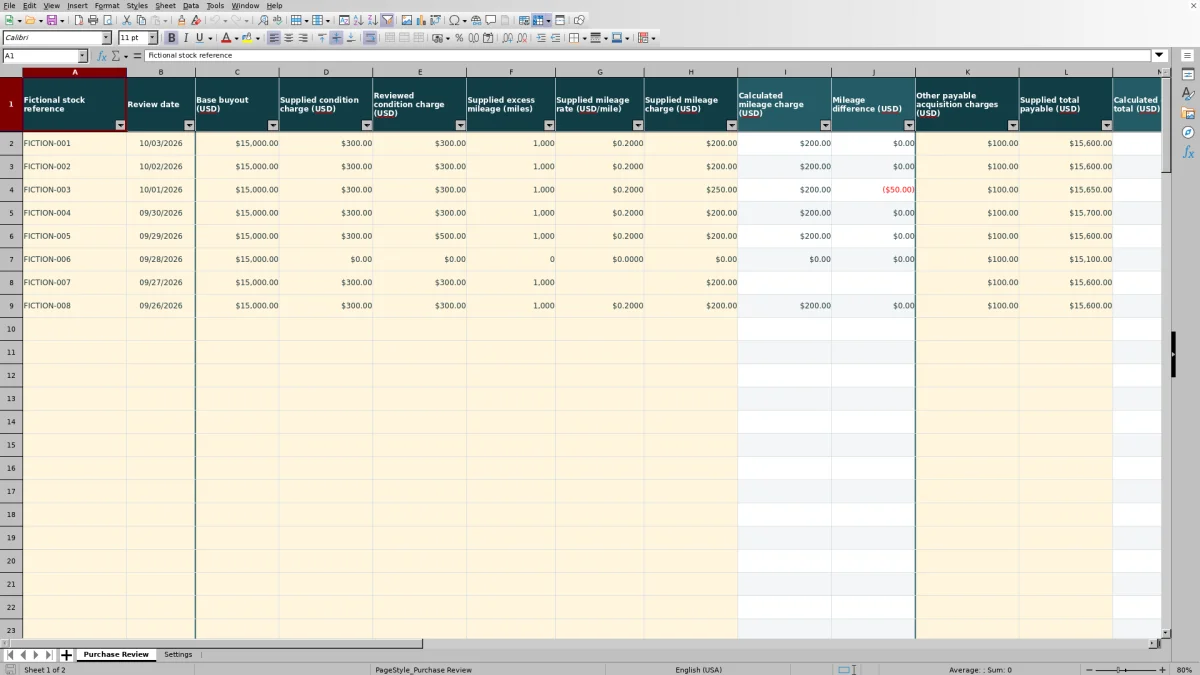
On Purchase Review, use one row for one purchase candidate and one set of supplied terms. Rows 2–9 contain fictional examples; remove their editable inputs from your working copy if you do not want them included in the status counts. Enter a unique review reference under Fictional stock reference and a Review date in MM/DD/YYYY format. Use Source and clarification note to identify the quote or unresolved question.
3. Enter the quote and your estimates
Enter the base buyout, supplied charges, excess miles, mileage rate, and supplied total. Add your reviewed condition charge, other payable acquisition charges, estimated preparation cost, and buyer budget. Use cream input cells only. Keep the base buyout free of amounts entered separately so an all-in quote is not counted twice.
4. Review differences before deciding
After the workbook recalculates, inspect Mileage difference (USD), Quoted total difference (USD), Budget headroom (USD), and Review status. Filter the status column to focus on a group of candidates, or see counts on Settings. Resolve missing evidence and disputed terms before treating a nonnegative headroom amount as support for a purchase decision.
Put the buyout quote on a consistent basis
Start by deciding which amounts are payable for this purchase. A supplied end-of-lease statement may include charges associated with returning the vehicle; do not automatically carry those into a buyout review. Confirm their treatment with the source of the terms.
The workbook’s quoted total uses supplied charges: base buyout plus supplied condition charge, supplied mileage charge, and other payable acquisition charges. It then subtracts Supplied total payable (USD). A positive Quoted total difference (USD) means the component calculation exceeds the supplied total; a negative result means it is lower.
For an all-in quote, separate the components consistently before entering them. If a fee is already inside Base buyout (USD), entering it again under Other payable acquisition charges (USD) would overstate the estimate. The worksheet checks arithmetic relationships, not whether each charge is actually owed.
Review mileage and condition without erasing supplied terms
Enter excess mileage in whole miles and the supplied rate in USD per mile. The rate displays four decimal places. Calculated mileage charge (USD) multiplies those inputs and rounds the result to two decimal places. Mileage difference (USD) is the calculated charge minus the supplied charge, so its sign tells you which amount is higher.
The workbook does not derive excess miles from an odometer reading or lease allowance. Confirm that the supplied excess-mile figure and rate apply to the purchase terms before relying on the result.
Keep Supplied condition charge (USD) as quoted and place your alternative amount in Reviewed condition charge (USD). The reviewed acquisition estimate uses your reviewed condition charge and the calculated mileage charge, rather than the two supplied charges. A reviewed amount is not an agreed adjustment. Record the basis for any difference in Source and clarification note and seek confirmation before treating it as settled.
Fictional example: from buyout terms to budget headroom
The workbook’s fictional FICTION-001 example uses a $15,000 base buyout, a $300 condition charge on both the supplied and reviewed sides, and $100 in other payable acquisition charges. Its supplied 1,000 excess miles at $0.2000 per mile calculate to $200, matching the supplied mileage charge.
Those inputs produce a $15,600 calculated quoted total, matching the $15,600 supplied total. The reviewed acquisition estimate is also $15,600. Adding $900 of estimated prep gives an acquisition-and-prep estimate of $16,500. Against a $17,000 budget covering those same costs, headroom is $500.
With complete inputs and differences within the initial $0.01 tolerance, the status is Within budget. That $500 is remaining room under the entered budget—not expected profit or available cash. Before proceeding, check whether the prep estimate and payable-charge inputs cover the costs you intend the budget to include.
In the fictional FICTION-002 example, the same $16,500 estimate is compared with a $16,400 budget. Headroom becomes negative $100 and the status is Over budget, pointing to a need to reconsider the terms, prep estimate, or budget.
Read the status in the right order
The status formula checks completeness first, then unresolved differences, and only then the budget. This order matters when a candidate has more than one issue.
- Incomplete means a started row lacks its reference, a numeric review date, required calculation inputs, or a numeric tolerance.
- Clarify terms means the inputs are present but the absolute mileage difference, quoted-total difference, or reviewed-versus-supplied condition difference exceeds the tolerance.
- Over budget means the differences are within tolerance but budget headroom is negative.
- Within budget means the differences are within tolerance and headroom is zero or positive.
Clarify terms takes priority over budget status. A candidate can therefore need clarification and also exceed budget. Read Budget headroom (USD) separately instead of assuming that the displayed status describes every issue.
The tolerance applies to differences, not to negative headroom. A fully reconciled row with headroom below zero remains Over budget. Within budget is not purchase approval.
Errors and solutions: incomplete rows and misleading results
If a calculated amount is blank, check its supporting inputs before interpreting it as no cost. The formulas wait for numeric amounts. Leave unsupported amounts blank; enter an explicit zero only when a zero charge has been confirmed. Filling gaps with zeros can make an uncertain review appear complete.
For an unexpected Incomplete status, check the reference, date, required amounts, and Settings B3. Use numeric entries rather than text such as “pending” in amount fields. Keep explanations in Source and clarification note. A fully blank input row stays unflagged.
If results look unchanged after editing, ensure the workbook recalculates. If they look inconsistent, inspect pasted values and check for overwritten formulas. Worksheet protection is not enabled, even though formula cells retain a locked attribute. Input validation can also be bypassed by pasting.
Keep a clean copy before making changes. Clear or replace inputs rather than deleting formula cells, and review pasted dates, amounts, miles, and references before using the results.
Keep the purchase decision within the worksheet’s limits
Each row represents a candidate and supplied purchase terms, not a vehicle already owned or consigned for retail sale. Once you acquire a car, its stock record and subsequent activity need to be handled separately.
The buyer budget covers acquisition and estimated preparation. The workbook’s amounts are expected payables and estimates—not invoices, receipts, settled funds, asking prices, or sale prices. It does not calculate a resale margin or establish a market value.
The worksheet does not verify title, diagnose safety, determine taxes, approve purchases, or submit registrations. Confirm those matters through the appropriate records and processes outside this review. If a tax or other payable amount belongs in your acquisition estimate, establish it separately before including it in the entered charges.
Preparation is recorded as a cost estimate. This file does not manage prep work orders, retail stock, sales, deal finance, or handover.
Comparison: this workbook or a blank spreadsheet
Use this workbook when your task is to reconcile supplied off-lease purchase terms and compare acquisition plus prep with a buyer budget. A blank spreadsheet is an alternative when you need a different cost structure and are prepared to build and check the calculations yourself.
| Method | Starting structure | Reconciliation and budget checks | Scope and upkeep |
|---|---|---|---|
| Car Dealer Sheets workbook | Two sheets with 100 candidate rows, input guidance, and fictional examples. | Existing mileage, total, headroom, status, and status-count formulas. | Focused on purchase review; inputs and unprotected formulas need careful handling. |
| Blank spreadsheet | You choose the fields, layout, and number of records. | You create and check the formulas, tolerance rules, and summaries. | You define the scope and maintain the calculation logic. |
If you need ongoing retail stock and deal administration rather than a candidate review, assess a separate system against those requirements. Do not assume this workbook connects to other software or takes over those tasks.
Frequently asked questions
Can I review a revised quote for the same car?
Yes. Each row represents one candidate and one set of supplied terms. If you keep the earlier quote as a separate row, give the revised review a distinct reference because the reference validation checks for duplicates. Use Source and clarification note to explain which terms each row represents. Status counts will count the review rows, not distinct physical vehicles.
Does the review date affect the calculations?
The status requires a numeric review date, displayed as MM/DD/YYYY. The supplied formulas do not calculate quote age, expiry, or a time-based charge from that date. Check the validity period of the supplied terms separately.
What happens when a difference exactly equals the tolerance?
Clarify terms is triggered when an absolute difference is greater than the tolerance, not equal to it. The tolerance starts at $0.01 in Settings B3 and applies across the review rows. Do not increase it merely to hide an unresolved charge.
Are the example records real purchase candidates?
No. Rows 2–9 contain fictional examples labeled FICTION-001 through FICTION-008. They illustrate different review outcomes and are included in the formula-based status counts while present. Remove their editable inputs from a live working copy without clearing the formulas.
Can I treat the budget headroom as money available to pay?
No. Budget headroom is the entered buyer budget minus the reviewed acquisition-and-prep estimate. It does not check a bank balance, record payment, or confirm settled funds. Verify funding and payment separately before committing to the purchase.
Editorial areas

Owen AshfordVehicle stock & purchasing
About this editorial area →
Mara WestbrookSales records & delivery
About this editorial area →