Before deciding where to spend your next buying day, compare what each sourcing channel produced. This Car Dealer Sheets Excel workbook groups closed vehicle-specific reviews by channel so you can assess usable purchases alongside the time and acquisition expense recorded.
The used car sourcing channel scorecard includes reviews that ended without a purchase, keeping unsuccessful sourcing effort in the comparison. It is a buying decision aid, not an automatic ranking or a vehicle valuation tool. Replace the fictional examples before using the results for your dealership.
When to use this workbook
- See how often closed sourcing reviews produced purchases that met your documented buying criteria.
- Include time and expense from unsuccessful reviews when assessing a channel.
- Identify incomplete records and duplicate references before relying on the comparison.
- Use sample counts alongside yield and per-purchase measures when deciding where to focus further buying effort.
What is in the file
How to use the workbook
1. Set your comparison rules
On Settings, enter the As-of Date in B2 using MM/DD/YYYY, replace the fictional Usable Purchase Criteria in B3, and choose Minimum Closed Reviews in B4. Check the five channel names in A6:A10 before entering records. Keep them unique and nonblank.
2. Remove the sample inputs
Closed Reviews rows 2–11 contain ten fictional reviews. Clear or replace their inputs in columns A:G, leaving the Record Status formulas in column H intact. Rows 2–101 are prepared for your reviews.
3. Enter completed sourcing reviews
Use one row per closed vehicle-specific review, including reviews with no purchase. Enter a unique review reference in the column currently headed Fictional Stock Reference, then record the closed date, channel, outcome, hours and actual acquisition expense in USD. Enter confirmed zeros explicitly. Set Costs Finalized? to Yes only when the costs are final.
4. Resolve exceptions and compare channels
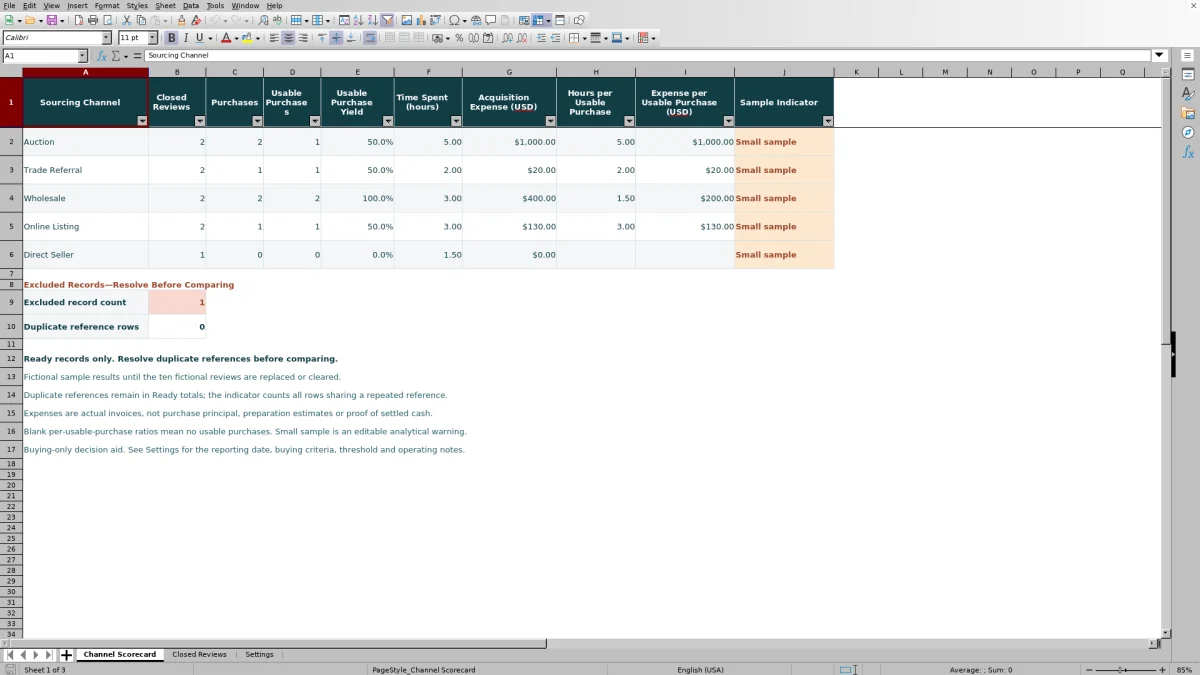
Check Record Status on Closed Reviews and the excluded-record and duplicate-reference counts on Channel Scorecard. Fix the underlying records before comparing usable purchase yield, hours per usable purchase and expense per usable purchase. Read Sample Indicator alongside those measures rather than treating any one number as a recommendation.
Decide what counts as a usable purchase
A purchase and a usable purchase answer different questions. Purchases counts Ready reviews with either Usable purchase or Other purchase as the outcome. Usable Purchases counts only the Usable purchase outcome.
Write your buying criteria in Settings B3 before classifying results. For example, your documented criteria might concern the target vehicle mix and acquisition budget; that is a suggested approach, not a rule applied by the workbook. Use Other purchase for a purchase that does not meet your criteria and No purchase when the review ended without buying the vehicle.
You assign the outcome. The workbook checks whether it is an allowed category, but it does not inspect the vehicle or test it against the text in B3. Usable purchase is not a safety diagnosis, title verification or valuation. If your criteria change, decide how to handle earlier reviews before interpreting a combined result.
Read yield and effort together
Usable Purchase Yield divides usable purchases by all Ready closed reviews for that channel. It answers: of the reviews included in the comparison, what share produced a usable purchase? It is not the share of purchases that were usable.
Hours per Usable Purchase divides all recorded hours from the channel's Ready reviews by its usable purchase count. Expense per Usable Purchase (USD) applies the same calculation to actual acquisition expense. Both measures include effort or expense attached to Other purchase and No purchase outcomes.
A channel can have a high yield but still require substantial time per usable purchase. Check both before deciding whether to devote another buying session to it. A blank ratio is not zero effort or zero expense: the per-usable-purchase measures are blank when there are no usable purchases. Yield is blank when there are no Ready closed reviews.
Keep sourcing expense separate from the car's cost
In Actual Acquisition Expense (USD) on Closed Reviews, enter final, actual invoiced sourcing fees and acquisition transport costs. Include applicable expenses for reviews that did not result in a purchase. Exclude vehicle purchase principal and all prep costs.
This boundary matters when you read the scorecard. Expense per Usable Purchase (USD) describes the recorded sourcing expense spread across usable purchases; it does not show the full acquisition cost of a car, its cost after prep or its profit potential. Hours remain a separate measure and are not converted into a labor charge.
Finalized expense does not mean settled funds. Costs Finalized? supports inclusion in the scorecard; it does not prove an invoice was paid. Check invoices for the expense entry and use your payment records separately when confirming settlement. Do not enter zero merely to make an unfinished record appear Ready.
Example: turn channel results into a buying decision
This fictional example assumes one channel has four Ready reviews through the selected As-of Date: two Usable purchase outcomes, one Other purchase and one No purchase. Together, the four reviews record 8 hours and USD 600 in final invoiced sourcing fees and acquisition transport costs, excluding purchase principal and prep.
- Purchases is 3: two usable purchases plus one other purchase.
- Usable Purchase Yield is 2 ÷ 4, or 50%.
- Hours per Usable Purchase is 8 ÷ 2, or 4 hours.
- Expense per Usable Purchase (USD) is USD 600 ÷ 2, or USD 300.
The interpretation is that half of the closed reviews produced a usable purchase, with 4 hours and USD 300 of recorded sourcing effort and expense per usable purchase across all four reviews. Compare those results with another channel using the same buying criteria and expense boundaries before allocating more time.
With Minimum Closed Reviews set to the supplied value of 3, this channel would show Compare. Compare is a count threshold, not an endorsement. Four reviews may still provide too little evidence for a major change in your buying approach.
Errors and solutions: missing results and duplicate references
If a review is missing from its channel totals, first check Record Status on Closed Reviews. Needs input means the row does not meet one or more inclusion checks. Confirm that it has a reference, a numeric closed date no later than the As-of Date, a listed channel and outcome, nonnegative numeric hours and expense, and Costs Finalized? set to Yes. Enter dates as whole dates in MM/DD/YYYY format.
A confirmed zero is valid for hours or expense; an empty cell is not a confirmed zero. If a channel name was changed on Settings, update the affected review records as well. Otherwise, the old name may no longer qualify for inclusion.
Resolve Duplicate reference rows separately. Duplicates can remain in Ready totals. The duplicate indicator counts every row sharing a repeated reference, not just the extra copies. For example, two rows with the same reference contribute two to that indicator. Check whether they are an accidental duplicate review or distinct reviews that need distinct references; do not delete a record solely to reduce the count.
Review Excluded record count before comparing channels. A channel with unfinished records may appear to have less time or expense simply because those records are not yet included.
Choose the reporting cutoff and respect the prepared range
The As-of Date on Settings is an upper cutoff for eligible closed reviews. There is no lower reporting-window cutoff: all otherwise eligible reviews in the prepared range through that date can contribute. Changing the As-of Date alone does not produce a monthly or quarterly comparison.
If you need a defined-period comparison, prepare a separate copy containing the intended closed reviews and retain your source records elsewhere. Check the date coverage manually so that you do not mistake cumulative results for a single period.
The supplied input formulas and scorecard references cover Closed Reviews rows 2–101, or 100 reviews. Do not assume entries below row 101 will be included. For ongoing volumes beyond that range, use a carefully maintained separate reporting copy or choose another recordkeeping approach rather than relying on unextended formulas.
Minimum Closed Reviews controls whether a channel shows Small sample or Compare once it has Ready reviews. A channel with none shows No closed reviews. The threshold is editable and is only an analytical warning, not a test of statistical reliability.
Compare this workbook with a blank spreadsheet or paper log
Choose a method based on how often you need to compare channels and how much calculation setup you want to maintain. This workbook provides a defined buying-only structure. A blank spreadsheet gives you a different starting point, while a paper log keeps entry manual without built-in calculations.
| Method | Initial setup | Channel comparison | Record checks | Capacity and scope |
|---|---|---|---|---|
| Car Dealer Sheets workbook | Set criteria, channels and cutoff; replace fictional inputs. | Prepared yield, hours and expense calculations for five channels. | Ready status, excluded-record count and duplicate-reference indicator. | 100 prepared reviews; buying-only analysis. |
| Blank spreadsheet | Design your own fields, categories and formulas. | Build and maintain the calculations you need. | Add your own checks or inspect entries manually. | You define the layout, reporting periods and scope. |
| Paper log | Create a consistent entry format. | Total and calculate results manually. | Review completeness and repeated references manually. | Add pages as needed; summaries remain manual. |
Use this workbook when its five-channel, 100-review structure fits the comparison you need. Consider a blank spreadsheet when you need a different reporting design and can maintain its calculations. A paper log may suit occasional recording when manual summaries are acceptable. If you need buying records connected with broader dealership operations, evaluate specialized dealer management software against those requirements; this workbook does not provide live integrations or inventory, sales and payment management.
Frequently asked questions
Does the scorecard pick the best sourcing channel?
No. It shows separate measures and a sample indicator, without a composite score or ranking. You decide how to weigh usable purchase yield, recorded hours, acquisition expense and the number of closed reviews.
Can I rename the sourcing channels?
Yes. Edit the five names in Settings A6:A10, keeping each unique and nonblank. If you rename one after entering reviews, update its existing records in Closed Reviews too. Adding a sixth name does not extend the supplied five-channel scorecard.
Should I record a review that ended without a purchase?
Yes, if it is a closed vehicle-specific sourcing review. Select No purchase and record the actual hours and eligible final expense. Use a unique review reference even when no vehicle was acquired. Once the row is Ready, it contributes to the channel's review count, time and expense.
Does Ready mean the vehicle is ready to sell?
No. Record Status describes whether the review meets the workbook's input checks for inclusion. It says nothing about physical condition, prep completion, title status or retail readiness. It also does not automatically exclude duplicate references.
Can I use this workbook to set asking prices or track payments?
No. It has no asking or sale prices, expected funds, settled receipts or payment functions. Use it to compare closed sourcing outcomes, and keep pricing, inventory, deal administration and payment records in separate systems or records suited to those tasks.
Editorial areas

Owen AshfordVehicle stock & purchasing
About this editorial area →
Mara WestbrookSales records & delivery
About this editorial area →