When a referring party introduces a seller, record the lead before the next conversation. This used car seller referral tracker from Car Dealer Sheets gives your buyer a place to record the referral, update its outcome and plan follow-up.
The Excel workbook separates active referrals from reported acquisitions and summarizes known promised amounts in USD. Use it as a buying follow-up record, not as proof of a vehicle purchase or a referral payment ledger.
When to use this workbook
- See which active seller referrals need attention based on the review date you set.
- Keep the referring party, seller alias and buyer notes together for the next conversation.
- Distinguish unknown referral promises from explicit zero amounts when reviewing acquisitions.
- Find flagged entries before using the summary to plan follow-up or review promises.
What is in the file
How to use the workbook
1. Remove the fictional entries
On Referrals, rows 2–11 contain fictional examples. Clear or replace their inputs in columns A–J before operational use. Preserve columns K–M, which contain formulas. Rows 12–101 are initially available for new entries.
2. Set your review date
Enter the date of your review in Settings!B2 using MM/DD/YYYY. Update this date manually each time you want the follow-up results to reflect a new review day; it does not advance automatically.
3. Enter each seller referral
Use one row per referral. Complete Referral ID, Received date, Referrer label, Seller label and Outcome. Use unique IDs and internal aliases, not contact details. Choose Active, Acquired or Declined, and give every Active referral a Next follow-up date. Record any known promise in Promised referral amount (USD), leaving an unknown amount blank.
4. Resolve flags and plan contact
Filter Review flag on Referrals and correct the source entries first. Then filter Follow-up status to find Overdue, Due today or Set date records. After contact, update Last contact date, Buyer note and the next follow-up date as appropriate.
5. Review the overall position
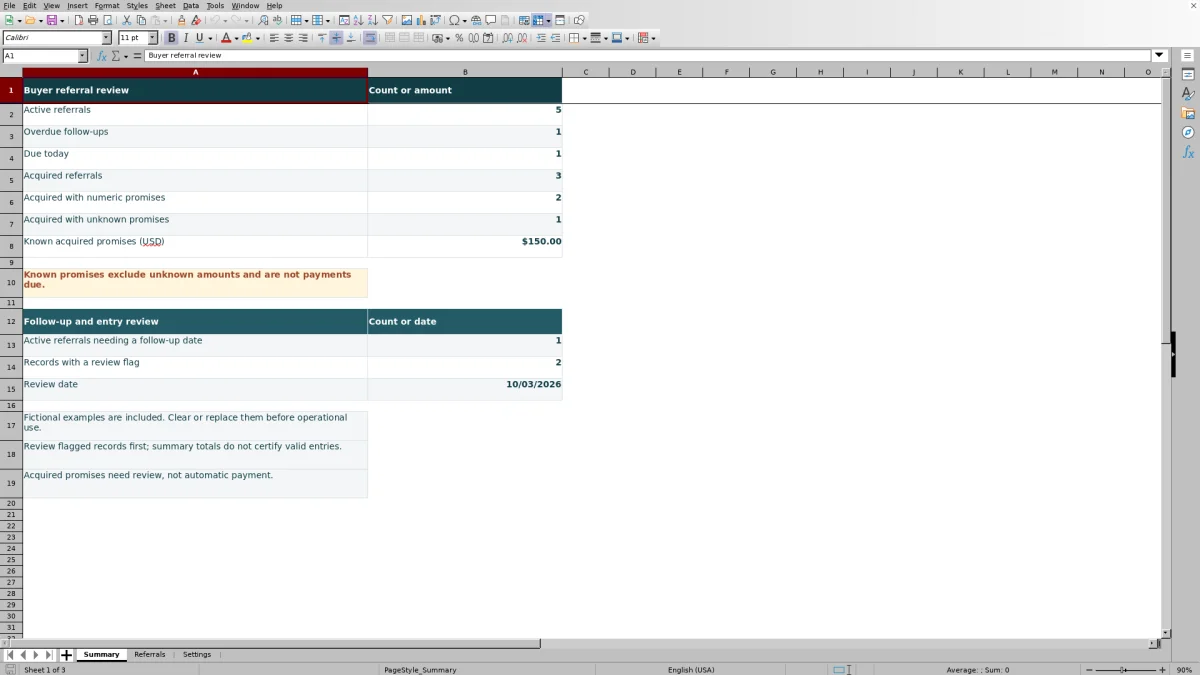
Open Summary to review active referrals, reported acquisitions, follow-up counts and acquired promises. Check records with unknown promises before treating the known amount as a complete picture. Summary counts and amounts do not automatically exclude flagged records.
Choose the next referral to contact
Start with entry problems, then review active follow-ups. An Overdue result means the recorded next follow-up date is before your review date. Due today means the dates match; Scheduled means the next date is later. Set date identifies an active referral without a next follow-up date.
Use these results to decide whom to contact and which records need scheduling. They are workbook review signals, not sent reminders: the file does not send messages or synchronize with another system.
Days since referral measures calendar days from Received date to the review date. It shows the age of the referral, not the time since your last contact and not a legal deadline. Check Last contact date and Buyer note before deciding whether an older referral needs another call.
Example: interpret an overdue referral
In a fictional example, a referral has a Received date of 09/19/2026, an Active outcome and a Next follow-up date of 10/02/2026. With Settings!B2 set to 10/03/2026, Days since referral is 14 calendar days and Follow-up status is Overdue.
The 14-day result comes from subtracting the received date from the review date. The overdue result comes from comparing the next follow-up date with that same review date. Together, they tell you that the referral has been open for two weeks and its planned contact date has passed—not that the seller is still willing to sell.
Check the buyer's notes, contact the seller through your separate contact record, and record what happened. If the referral remains active and you schedule the next contact for 10/06/2026, the status becomes Scheduled against the 10/03/2026 review date. Advance the review date when you next review the file.
Review promised amounts without treating them as payable
Enter nonnegative USD amounts in Promised referral amount (USD). Blank means unknown; zero means an explicit zero promise. This distinction matters because Summary separates acquired referrals with numeric promises from acquired referrals with unknown promises.
For a fictional example, suppose three referrals are marked Acquired and their promised amounts are $100.00, $0.00 and blank. Summary shows three acquired referrals, two with numeric promises, one with an unknown promise, and $100.00 in Known acquired promises (USD). The $100.00 is only the known portion; your next step is to clarify the missing promise.
If no acquired referral has a numeric promise, the known-amount total is blank rather than zero. A zero total can therefore mean known numeric promises of zero, while a blank total means there are no numeric acquired promises to total.
These amounts are promises, not payment eligibility, payments due or settled funds. Review the underlying agreement separately before authorizing any payment, and keep payment records outside this tracker.
Fix entry problems before relying on totals
Review flag can identify a missing or duplicate Referral ID, incomplete required fields and problems with the review date. For a duplicate, check whether the same referral was entered twice or two distinct referrals were assigned the same ID. Correct the source record rather than merely changing an ID to hide the warning.
- For Complete required fields, check Received date, Referrer label, Seller label and Outcome, as well as the referral ID.
- For Set date in Follow-up status, enter the next planned contact date for the active referral.
- For Check date in Follow-up status, confirm that dates are actual spreadsheet dates and that Next follow-up date is not before Received date.
- If Days since referral is blank, check the referral ID, received date and review date. A blank result is not evidence of a zero-day-old referral.
Enter dates as MM/DD/YYYY without time values. Received date must not be later than the review date; Last contact date must fall between the received and review dates. Validation permits blanks during entry, and pasted data may bypass validation. Flagged records still affect summary results, so resolve warnings and inspect the entries before relying on the totals.
Keep referral records separate from purchase evidence
One row represents one seller referral, not a vehicle purchase or payment transaction. Use internal aliases in Referrer label and Seller label. The entry guide excludes contact details, license details and credit data. Stock reference is optional and is intended for a fictional reference, never a vehicle identification number (VIN); it does not link the workbook to inventory.
Acquired is a manually reported buying outcome. It does not verify ownership, title or payment. Keep the supporting acquisition records separately, and use Buyer note for relevant referral context rather than treating the outcome as purchase evidence.
Only Active referrals receive follow-up status results. Changing a referral to Acquired or Declined removes it from that active follow-up view, even if a Next follow-up date remains entered. Handle any later promise review separately rather than assuming the tracker will remind you.
Work within the prepared record range
The workbook provides 100 referral rows, from row 2 through row 101. Once you remove the fictional examples, all 100 can hold your records. The summary formulas and duplicate-ID check use that fixed range, and the calculated columns are prepared only through row 101.
Do not assume row 102 is included. Adding records below the prepared range does not, by itself, extend the summary formulas, validation, filters or review calculations. If you need a larger register, extend and check the affected ranges before relying on it, or choose a workflow designed for your volume.
Keep the allowed outcomes Active, Acquired and Declined unchanged in Settings!D2:D4. Those labels drive the dropdown and the calculations; renaming them is not a supported way to add a new stage.
Compare the workbook with a blank spreadsheet
Choose according to how much structure your referral process needs. This workbook supplies a defined buying-referral layout and review calculations. A blank spreadsheet leaves the structure and rules for you to design.
| Method | Starting structure | Follow-up review | Promise review | Record scope |
|---|---|---|---|---|
| Car Dealer Sheets workbook | Prepared referral fields, validation and three sheets | Calculated status against a manually entered review date | Known and unknown acquired promises separated in Summary | 100 prepared referral rows; not a purchase or payment ledger |
| Blank spreadsheet | You choose and build the fields | You review dates manually or create your own formulas | You define how blanks, zeros and totals are handled | You set the layout and maintain its ranges and rules |
Use this workbook when the prepared fields and three outcomes fit your process and you can maintain the review date and entries manually. Start from a blank spreadsheet when you need a different structure and are prepared to build and check its rules. If you need shared workflow, integrations or payment administration, evaluate specialized dealer management software against those requirements; this workbook does not provide them.
Frequently asked questions
Is this for sellers referred to my buyer or customers referred to sales?
It is for buying-side seller referrals. Record the party making the introduction, the seller alias and the referral outcome. It is not a retail customer referral tracker or a sales deal register.
Can I record an active referral before a promise is agreed?
Yes. Leave Promised referral amount (USD) blank while the amount is unknown, and use Buyer note for the unresolved question. Do not enter zero unless the promise is explicitly zero. Give the active referral a next follow-up date.
Does Last contact date determine the next follow-up date?
No. You enter both dates. Follow-up status compares Next follow-up date with the review date in Settings!B2; it does not calculate a contact interval from Last contact date.
Can I use the summary to rank referring parties?
The supplied Summary reports overall counts and acquired promises, not a referrer ranking or conversion rate. You can filter Referrer label on Referrals to inspect that party's records, but assess the underlying outcomes and missing information yourself.
Does the workbook keep a payment history?
No. It records promised amounts but has no payment transaction ledger, payment status or automatic payments. Keep authorization and payment evidence in your separate bookkeeping records.
Editorial areas

Owen AshfordVehicle stock & purchasing
About this editorial area →
Mara WestbrookSales records & delivery
About this editorial area →