Before accepting a purchase offer for a used car, compare what you expect to pay, when full payment is due and which prep the seller promises to include. This Car Dealer Sheets workbook brings those terms together for one vehicle and its alternative purchase offers.
Enter the proposed prices and remaining acquisition costs, set your minimum acceptable payment interval, then review the lowest qualifying estimate. The spreadsheet supports your buying decision; it does not verify the vehicle, confirm the seller’s work or turn the lowest estimate into a recommendation.
When to use this workbook
- Compare estimated acquisition outlay rather than proposed purchase price alone.
- Separate offers that allow your chosen payment interval from those requiring earlier full payment.
- Keep seller-included prep beside your remaining cost estimates for a clearer review.
- See when multiple qualifying offers share the lowest estimate so you can review the terms before choosing.
What is in the file
How to use the workbook
1. Identify the vehicle and set your payment preference
In Settings, replace the fictional reference in B2 with your stock number or other vehicle reference. Enter the comparison date in B3 using MM/DD/YYYY and your minimum acceptable payment interval in B4. The starting value of 3 days is an editable buyer preference, not a legal deadline. Keep all three settings complete.
2. Replace the fictional offers
Replace or clear the eight fictional offers before using the file for an actual decision. Enter your offers in Offers A2:I101, using a unique offer reference for each alternative. All rows must concern the vehicle identified in Settings. Enter dates as dates, costs in USD and payment intervals as whole days after acceptance.
3. Complete costs, included work and availability
Describe the seller’s promised work in Seller-included repairs or preparation, or enter None. Enter your remaining prep estimate and other acquisition costs without duplicating amounts already included elsewhere. Use an explicit 0 where you estimate no cost; leave an unknown amount blank until you can resolve it. Set Offer availability to Available or Withdrawn after checking with the seller.
4. Review the result before accepting terms
Check Review status in Offers, then open Decision to see the qualifying-offer count, lowest qualifying estimated outlay, first matching reference and tie count. Review every tied offer, not just the first reference displayed. Confirm the cost assumptions, promised prep and full-payment terms with the seller before deciding. Leave Offers J:M and the calculated Decision results intact.
Compare the acquisition estimate, not just the purchase price
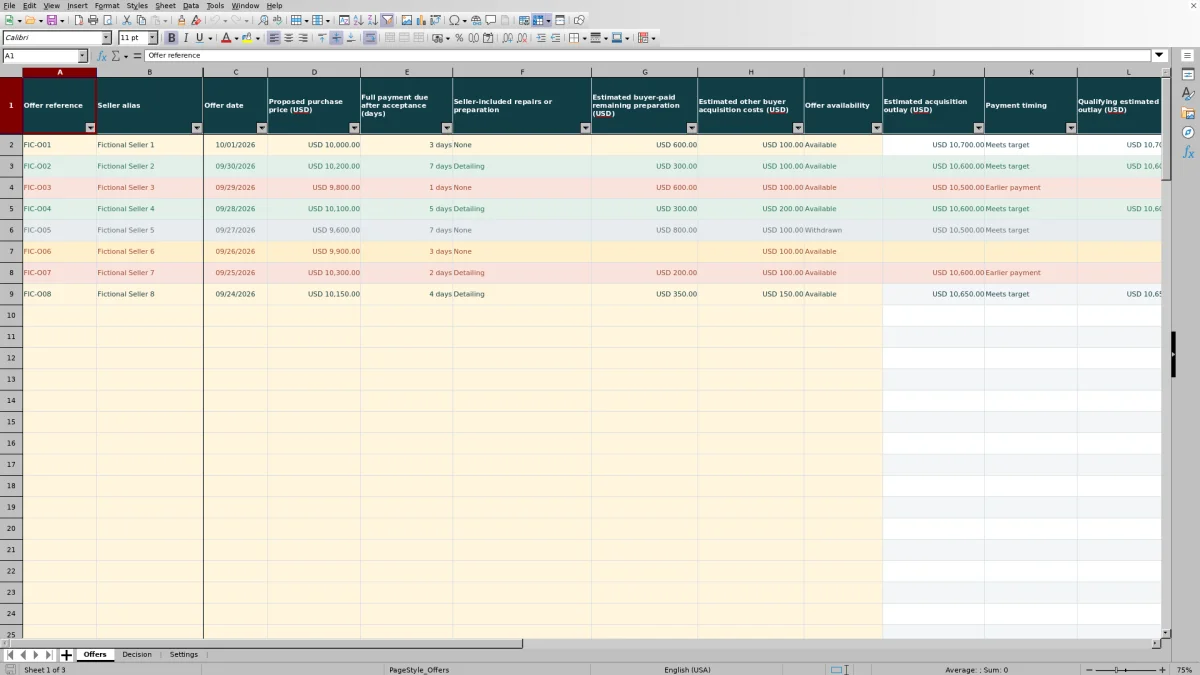
A lower proposed purchase price can leave you with more prep to pay for. Estimated acquisition outlay (USD) adds three inputs: Proposed purchase price (USD), Estimated buyer-paid remaining preparation (USD) and Estimated other buyer acquisition costs (USD). In a complete row, the calculation is D + G + H.
Count each cost once. Remaining prep in G must exclude work the seller includes in F. Other acquisition costs in H must exclude amounts already included in the proposed price or remaining prep. Check the seller’s terms and your supporting estimates before deciding where a charge belongs.
This result is an estimate of the amounts you recorded, not an actual invoice total or a retail asking price. The workbook does not determine taxes. If you include a tax amount or another acquisition charge in your estimate, establish it separately and avoid counting it twice.
Use payment timing as a buying requirement
Full payment due after acceptance (days) records how many whole days you expect to have between accepting the offer and owing full payment. The workbook compares that entry with Settings B4. An interval equal to or greater than your target receives Meets target; a shorter interval receives Earlier payment.
For example, with a 3-day target, an available, complete offer allowing 3 days qualifies, while one requiring full payment after 1 day does not. This is a threshold test, not a score: an offer allowing 7 days receives no extra ranking benefit over one allowing 3 days. Qualifying offers are compared by estimated outlay.
Availability must be confirmed manually. A complete Withdrawn offer is excluded from qualification even if its price and timing would otherwise suit you. Neither the offer date nor the comparison date expires an offer automatically. Recheck availability and the agreed interval when you are ready to accept.
Turn seller-included prep into a useful cost assumption
Use Seller-included repairs or preparation to capture the seller’s stated commitment. A description such as Detailing is useful context, but it does not assign a dollar credit or confirm that the work has been completed. You must compare the descriptions yourself.
Before estimating your remaining prep, clarify what the seller will actually do and what will still be your responsibility. Then enter only the buyer-paid remainder in G. If the scope is uncertain, keep the unresolved estimate blank rather than using zero to make the offer qualify.
When two offers have the same estimated outlay, included work can still affect your choice. Review the scope and evidence of completion separately. The workbook records the promise; it does not diagnose the vehicle or manage prep execution.
Fictional example: a lower price can fail your timing target
The workbook’s seeded offers are fictional. With the initial 3-day payment target, FIC-O01 has a USD 10,000 purchase price, USD 600 remaining prep and USD 100 other acquisition costs. Its estimated outlay is USD 10,700, and its 3-day payment interval meets the target.
FIC-O02 has a higher USD 10,200 purchase price, but only USD 300 estimated remaining prep, plus USD 100 other acquisition costs. Its total is USD 10,600, and its 7-day interval meets the target. The row records Detailing as seller-included work; the formula does not subtract a separate detailing credit. The lower remaining-prep estimate is what contributes to the lower total.
FIC-O03 totals USD 10,500: USD 9,800 purchase price + USD 600 remaining prep + USD 100 other costs. However, full payment is due after 1 day, so it is excluded from the qualifying comparison under the 3-day target.
Across all eight initial fictional offers, the expected result is four qualifying offers, a lowest qualifying estimate of USD 10,600 and two offers tied at that amount. Decision displays FIC-O02 as the first match. First match is not a recommendation; it follows row order. Your next action is to review both tied offers and confirm their terms, not accept the displayed reference automatically.
Errors and solutions for incomplete or misleading offers
If a started row shows Incomplete and its outlay is blank, check every input in A:I. Offer reference, Seller alias and the included-work description must be present. Offer date, price, payment interval and both cost estimates must be numeric entries of the appropriate kind. Availability must be Available or Withdrawn.
- Missing included-work description: enter None in F if the seller includes no repairs or prep. Do not leave the field blank to mean none.
- Missing cost estimate: enter 0 in G or H only when you estimate no cost. A blank means the required estimate is missing; it is not treated as zero. Resolve an unknown cost before relying on the comparison.
- Date or amount pasted as text: replace it with a valid date or number. Displaying digits does not necessarily make an entry numeric.
- Invalid pasted values: check for negative costs, negative intervals and fractional days. Validation is provided, but pasted data can bypass it; a calculated total does not certify that the inputs are appropriate.
- A withdrawn offer still shows an outlay: this is expected, not a qualification error. Use Review status to confirm its exclusion from the qualifying comparison.
A withdrawn offer can retain both its estimated outlay and payment-timing result. Only its qualifying-outlay entry is excluded from the values used by Decision, allowing you to retain the recorded terms without treating them as an available choice.
Keep the buying comparison within its limits
This workbook compares alternative single-payment acquisition offers for one identified vehicle. It is not a record of completed purchases or a multi-vehicle stock register. Because the vehicle reference is held once in Settings rather than on each offer row, mixing offers for different cars would produce a misleading comparison.
Expected payment timing is not settled funds. The file records an interval until full payment is due; it does not execute payments or track installments, financing or consumer lending. It also does not track retail sales, customer handover or live integrations.
Keep vehicle checks and transaction evidence outside this comparison. The workbook does not verify title, diagnose safety, certify roadworthiness, submit registrations or provide legal or compliance advice. Use the estimate to narrow your review, then resolve those separate requirements before committing to the purchase.
Comparison: this workbook versus a blank spreadsheet
For an independent dealership comparing purchase terms, a blank spreadsheet is a realistic operational alternative to the complete Car Dealer Sheets workbook. This workbook supplies a defined input structure, qualification rules and a decision summary. With a blank spreadsheet, you decide what to record and must build or manually perform those checks yourself.
| Method | Setup and upkeep | Cost and payment review | Decision support | Scope and limits |
|---|---|---|---|---|
| Car Dealer Sheets workbook | Replace fictional data, complete the settings and maintain offer inputs in the provided 100-row area. | Totals purchase price, remaining prep and other acquisition estimates; tests payment intervals against your chosen minimum. | Calculates the qualifying count, lowest qualifying estimate, first matching reference and tie count. | Designed for alternative single-payment offers for one vehicle. Availability, included work and vehicle checks remain your responsibility. |
| Blank spreadsheet | Create your own fields, layout, formulas and input checks, then maintain them as your process changes. | Choose your own cost categories and payment rules; build and check the calculations or review them manually. | Create a summary and tie-handling method, or inspect the offer rows yourself. | Can be designed around a different comparison structure, but has no purchase-offer logic until you add it. Seller terms and vehicle checks still require separate confirmation. |
Choose this workbook when you need the supplied one-vehicle comparison and its cost components and payment threshold match your buying task. Choose a blank spreadsheet when your process requires a materially different structure and you are prepared to establish and check its rules.
Neither choice should be treated as verification of an offer or vehicle. If you need staged-payment analysis, design that separately rather than adding installment notes to this workbook and assuming its single-payment qualification rule covers them.
Frequently asked questions
How many purchase offers can I compare?
The provided entry area is Offers A2:I101, giving you 100 offer rows for the same vehicle. The calculation columns and Decision formulas cover rows 2 through 101. Entries below that range are not included in the existing summary formulas.
What does “No qualifying offers” mean?
It means no offer currently contributes a numeric qualifying outlay to Decision. Check for incomplete inputs, Withdrawn availability or payment intervals below your target. The lowest qualifying outlay stays blank when the qualifying count is zero; that blank does not mean the vehicle has no acquisition cost.
Does the comparison date change the payment interval?
No. The comparison date is a review date. The payment test compares the whole-day interval you entered in Offers with the minimum interval in Settings; it does not calculate elapsed time from the offer date or an acceptance date. Confirm the actual due terms separately with the seller.
Why should every offer reference be unique?
Decision returns an offer reference to help you locate the first row matching the lowest qualifying estimate. Reusing the same reference for different alternatives makes that result harder to trace. Give each version its own reference and mark an old alternative Withdrawn if the seller no longer makes it available.
Editorial areas

Owen AshfordVehicle stock & purchasing
About this editorial area →
Mara WestbrookSales records & delivery
About this editorial area →