Before bidding on a used car, work back from the price you expect to agree with a retail buyer. This Car Dealer Sheets Excel workbook uses your resale estimate, buying allowances, auction fee tiers and target projected gross margin to calculate a maximum modeled bid.
Use the result as a planning limit to review before the auction, not as purchase approval. The workbook includes fictional examples; replace their prices, costs, dates and fee assumptions with your own inputs before making a buying decision.
When to use this workbook
- Turn a resale estimate and target margin into a whole-dollar bid limit you can review before bidding.
- Keep transport, prep and other buying allowances visible rather than treating the hammer price as the full buying cost.
- Account for flat fee changes across three bid bands when deciding how high to bid.
- Identify incomplete scenarios and bids constrained by the modeled fee range before relying on the result.
What is in the file
How to use the workbook
1. Set your target margin
On Settings, enter Target Projected Gross Margin in B2 as a numeric percentage from 0% to less than 100%. The initial 20% is a fictional assumption. This is profit divided by expected agreed resale price, not a markup on cost, and the same target applies to every scenario.
2. Replace the fictional fee bands
On Fee Tiers, edit A2:C4 using the fee information you intend to model. Enter three contiguous whole-dollar bid bands, starting at zero, with a nonnegative Flat Auction Fee for each band. Check that Configuration Status in E2 says Ready. This confirms the settings meet the workbook's calculation rules; it does not verify them against an auction's charges.
3. Enter a buying scenario
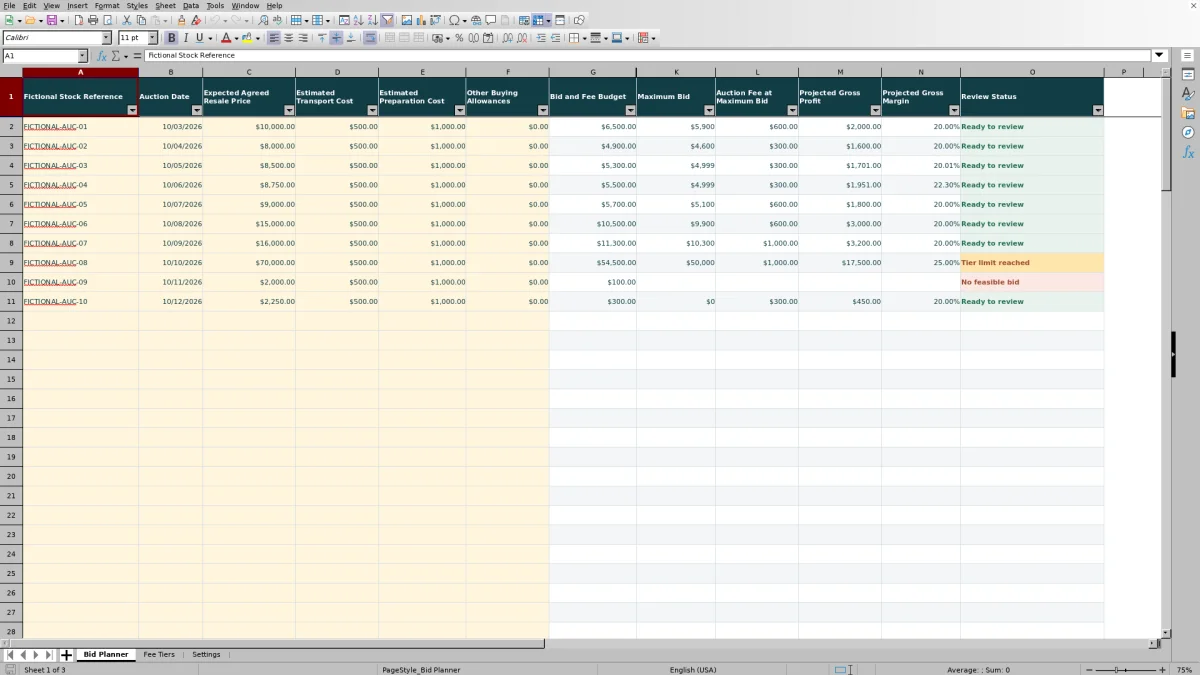
On Bid Planner, use the pale cream input cells. Enter your stock number or scenario reference under Fictional Stock Reference, an Auction Date in MM/DD/YYYY format, a positive Expected Agreed Resale Price, and the three buying allowances. All amounts are USD. Enter numeric zero for an allowance you do not need; leaving it blank prevents the calculation. Rows 2–11 contain fictional examples, including formula-generated dates, so replace those dates when using those rows for your own scenarios.
4. Review the limit before bidding
Read Maximum Bid alongside Auction Fee at Maximum Bid, Projected Gross Profit, Projected Gross Margin and Review Status. Resolve any warning before using the figures. Keep the formulas in columns G:O intact, including hidden candidate calculations in H:J. Formula results are not pre-cached, so allow the workbook to recalculate in Excel before reviewing outputs.
Work back from an agreed resale price, not an asking price
Start with the price you anticipate agreeing with the buyer. Expected Agreed Resale Price is a manual estimate, not a valuation supplied by the workbook. If your asking price leaves room for negotiation, using it without an adjustment can give you more bidding room than the expected deal supports.
The calculation first reserves the target share of resale as projected gross profit. It then subtracts transport, prep and other buying allowances. What remains in Bid and Fee Budget must cover both the auction bid and its flat fee:
Bid and fee budget = expected agreed resale price × (1 − target projected gross margin) − transport − preparation − other buying allowances.
Margin is measured against resale, not cost. A 20% target on a fictional USD 10,000 resale reserves USD 2,000 of projected gross profit. The reported profit subtracts the modeled bid, auction fee and allowances; financing, overhead and taxes are excluded, and the workbook makes no tax determination. Review those exclusions separately before treating a scenario as commercially acceptable.
Check what the three auction fee bands can represent
A fee increase at a band boundary can make a slightly higher bid unaffordable under your target margin. The workbook therefore calculates a candidate bid within each of the three bands, then selects the highest feasible candidate. It does not simply subtract one assumed fee from the budget.
On Fee Tiers, each Minimum Bid and Maximum Bid is an inclusive whole-dollar boundary. The first minimum must be zero, and each following minimum must equal the previous maximum plus one. Fees must be numeric and nonnegative, but they do not have to increase from one band to the next.
Only three flat-fee bands are modeled. A percentage-based charge, a more detailed fee schedule or another bid-dependent charge is not automatically represented by these inputs. Use Other Buying Allowances for additional fixed estimates where appropriate, and calculate charges outside this model separately when they cannot be represented faithfully.
Maximum Bid is rounded down to a whole dollar, not to an auction-specific bidding increment. If the auction requires larger increments, choose an allowed bid no higher than the modeled limit and check the applicable fee. If Review Status says Tier limit reached, higher bids were not modeled; verify the real fee schedule before changing the upper boundary.
Example: interpret the bid limit and a fee-boundary result
This is a fictional example in USD. Assume expected agreed resale of USD 10,000, a 20% target gross margin, USD 500 transport, USD 1,000 prep and USD 0 other buying allowances. Use the workbook's fictional fee bands: USD 0–4,999 with a USD 300 fee; USD 5,000–9,999 with a USD 600 fee; and USD 10,000–50,000 with a USD 1,000 fee.
The bid and fee budget is USD 10,000 × 80% − USD 1,500 = USD 6,500. Within the second band, a USD 5,900 bid plus the USD 600 fee uses that budget. Projected gross profit is USD 10,000 − USD 1,500 − USD 5,900 − USD 600 = USD 2,000, or 20% of resale.
The decision is to review USD 5,900 as the modeled ceiling, not as a recommended opening bid. Before bidding, check the resale assumption, cost allowances and fee against the information you have for that car.
Now change only the fictional resale estimate to USD 8,750. The budget becomes USD 5,500. A USD 5,000 bid would require USD 5,600 including the second-band fee, so it does not fit. The highest feasible bid is USD 4,999 with the first-band USD 300 fee. Projected gross profit is USD 1,951, about 22.30% of resale. The margin exceeds the 20% target because crossing into the next fee band would use too much of the budget; that extra margin is not permission to ignore the fee jump.
Test uncertain resale and prep assumptions before committing
Use separate prepared rows to compare a base case with a more cautious case for the same car. Give each scenario a distinct reference, retain the same applicable fee settings, and change the resale estimate or buying allowances you want to test. This is a manual comparison, not an automatic forecast or sensitivity report.
A lower expected resale reduces the amount available for the bid and fee after reserving the target margin. A higher prep allowance also reduces that budget. Maximum Bid may move by a different amount when the change takes the scenario across a fee boundary.
Keep supporting inspection notes, transport quotes and the basis for your resale estimate outside the workbook. It does not supply a valuation feed, decode a vehicle identification number (VIN), verify title or assess roadworthiness. The output is only as useful as the assumptions you enter. If a major cost remains uncertain, review a cautious allowance rather than treating an empty cost cell as zero.
Errors and solutions: missing results and review warnings
A blank result is not necessarily a zero-dollar bid. Unused rows deliberately show no formula outputs. Once you enter a reference, Review Status helps you identify what needs attention.
- Complete inputs or settings: Check for a valid Auction Date, a positive numeric resale price and numeric values of zero or more in all three allowance fields. Then check the target margin in Settings B2 and Configuration Status on Fee Tiers. Text amounts, missing allowances, invalid fee bounds or gaps between bands can suppress results.
- No feasible bid: No nonnegative bid within the modeled bands meets the target using your inputs. Recheck the assumptions. If they remain appropriate, the scenario does not support a bid under that target; do not lower the target merely to remove the warning.
- Check fee lookup: Review the fee table and the formula in Auction Fee at Maximum Bid before relying on the profit or margin.
- Tier limit reached: The result equals the top of the third band. Review that boundary because it limits the modeled range.
- Ready to review: The calculation is available for your review. It is not approval to buy.
A red Projected Gross Margin indicates a calculation-check exception below the target, with the comparison ignoring differences beyond 10 decimal places. Recheck edited formulas and settings rather than interpreting the highlight as an acceptable deal.
Keep a buying projection separate from the acquired car record
This workbook supports the decision before acquisition. Its stock references identify scenarios; they do not establish that you own the car. Likewise, the auction date is an input to the scenario, not an auction booking or a verified event date.
If you buy the car, record the actual hammer price, fees and invoices in your acquisition and accounting records. Projected Gross Profit here is calculated at Maximum Bid, not at an actual winning bid entered elsewhere. The file does not track owned or consigned stock, manage prep work, administer a retail sale or record settled funds.
It is also a manual workbook with no synchronization, external integrations, messages, payments or macros. Retain a separate dated copy if you need to preserve the assumptions used for a buying decision; changing the shared target or fee settings changes the basis of the scenarios in the working file.
Compare the workbook with a blank spreadsheet or paper log
Choose the method according to the calculation and recordkeeping you need. This workbook provides a defined three-band planning model. A blank spreadsheet gives you a starting point for a different model, while paper can serve as a simple note-taking method without built-in calculation checks.
| Method | Calculation setup | Fee handling | Review and record scope |
|---|---|---|---|
| Car Dealer Sheets bid workbook | Prepared formulas for 100 scenarios using one shared margin target. | Three contiguous whole-dollar bands with a flat fee in each. | Input and status checks for buying projections; not an acquired-stock or accounting record. |
| Blank spreadsheet | You design and check the inputs, formulas and layout. | You must build the fee logic your calculation requires. | Record scope and error checks depend on what you create. |
| Paper log with manual calculations | You calculate and write down each scenario yourself. | You consult the fee schedule and check boundaries manually. | Useful for notes, but has no formula-driven recalculation or input checks. |
Use this workbook when its three flat-fee bands and shared target match your planning needs. Consider a separately designed spreadsheet when the fee structure cannot fit those constraints. If you need acquisition accounting, stock tracking or wider deal administration, evaluate a separate system against those requirements rather than extending a bid projection into an unsupported operating record.
Frequently asked questions
Why do the sample auction dates change when I edit Settings?
Bid Planner B2:B11 contains fictional sample dates based on Example Date Anchor in Settings B3, plus offsets of one through ten days. They are not dates retrieved from an auction. Replace them with your intended auction dates when reusing those rows, and use MM/DD/YYYY format.
Can I enter a different target margin or fee schedule for each car?
Not through the prepared row inputs. All scenarios use Target Projected Gross Margin in Settings B2 and the same three bands on Fee Tiers. Keep separate workbook copies when you need to retain scenarios under different targets or auction fee schedules.
What do a zero bid and a negative candidate mean?
Zero is a valid feasible Maximum Bid under the model; it is different from a blank result. The hidden candidate columns H:J use −1 to mark a band with no feasible candidate. That internal marker is not a suggested negative bid. If every band is infeasible, Maximum Bid stays blank and Review Status says No feasible bid.
How many cars or scenarios can I plan in the file?
Rows 2–101 are prepared for 100 scenarios, and the first ten contain fictional examples. Separate rows can represent separate cars or alternative assumptions for one car. Rows beyond 101 are not part of the prepared calculation range.
Does the calculator show profit at my actual winning bid?
No. The prepared profit and margin outputs use Maximum Bid and Auction Fee at Maximum Bid. If you win at another price, calculate the actual acquisition position separately using that price and its applicable fee. Estimates in this workbook are not actual invoices, customer funds or settled receipts.
Editorial areas

Owen AshfordVehicle stock & purchasing
About this editorial area →
Mara WestbrookSales records & delivery
About this editorial area →