When an agreed vehicle acquisition falls through, you need to know what deposit remains unresolved and what to do next. The Car Dealer Sheets purchase cancellation tracker is an Excel workbook for recording abandoned acquisitions, refund expectations and follow-up through closure.
Use one row per canceled acquisition agreement, then review the calculated balances and action flags before contacting the supplier or closing the record. The workbook separates expected recovery from settled funds; its totals reflect your entries, not independent confirmation of the money owed or received.
When to use this workbook
- Keep each abandoned acquisition tied to its cancellation reference, stock reference and supplier alias.
- Distinguish a refund still expected from a deposit amount that remains unaccounted for.
- Identify missing information and follow-up targets that need attention during your review.
- Check deposit accounting and closure dates before treating a cancellation as complete.
What is in the file
How to use the workbook
1. Replace the fictional records
On Cancellations, replace or clear the fictional input data in rows 2–11 before using the totals. Rows 12–101 are ready for entry. Edit the pale cream input cells, but preserve the calculated columns I, J and O. The sheets are not protected, so formulas can be overwritten accidentally.
2. Set the review date
Check Settings!B2, labeled Review date. It defaults to TODAY(), or you can enter a specific date for your review. Dates use MM/DD/YYYY. If you replace the formula with a date, that date will remain fixed until you change it.
3. Enter the canceled acquisition
Complete columns A–F and M on Cancellations: the references, supplier alias, cancellation date, deposit, expected total refund and status. Enter an explicit zero in Deposit paid (USD) and Expected total refund (USD) when applicable. Use a distinct Cancellation reference for each agreement.
4. Record money and the next action
Update Settled refunds received (USD) with confirmed receipts and Approved unrecovered amount (USD) with the amount approved to remain unrecovered. For a non-closed record, enter Next action and Action target date. Choose Open or Waiting for refund as appropriate; do not record a promised refund as settled funds.
5. Review exceptions before totals or closure
Filter Cancellations by nonblank Review flag values, resolve each displayed issue and review again. Also inspect the red duplicate references in column A. Then check Summary. Use Closed only after the deposit is accounted for, and enter a Closed date on or after the cancellation date.
Practical example: read the two balances before chasing a refund
Pending and unaccounted are different questions. Expected refund pending (USD) subtracts settled refunds from the expected total refund. It is a forecast of recovery still expected. Unaccounted deposit (USD) subtracts both settled refunds and approved unrecovered amounts from the deposit paid. It shows how much of the original deposit still lacks either form of accounting.
For a fictional example, enter a $1,000 USD deposit, an $800 USD expected total refund, $300 USD in settled refunds and a $100 USD approved unrecovered amount. Expected refund pending is $500 USD: $800 minus $300. Unaccounted deposit is $600 USD: $1,000 minus $300 minus $100.
The $100 USD difference is a portion of the deposit not covered by either the current refund expectation or the approved unrecovered amount. Follow up on the expected $500 USD recovery, and separately establish how the remaining $100 USD should be handled. Do not increase an approved unrecovered amount simply to force the balance to zero.
Both calculated balances stop at zero rather than displaying negative amounts. That makes the amount checks important: a zero balance alone does not establish that the entries are consistent.
Turn a cancellation review into a follow-up list
Use Next action for a concrete task you can carry out, such as requesting refund confirmation or checking whether a receipt has settled. Action target date is your internal follow-up date. It is not a calculated legal deadline, and the workbook does not send messages or reminders.
The overdue check compares the target with Settings!B2. A target earlier than the review date can produce Action overdue; a target equal to the review date is not overdue. For a fictional example, with a review date of 10/05/2026, a 10/02/2026 target is overdue, while a 10/05/2026 target is not.
The first unresolved issue takes priority. A record with missing required information may show Complete required fields instead of Action overdue. Fix the displayed flag and check the row again before assuming the follow-up list is complete.
Errors and solutions: fix flags and check silent gaps
- Complete required fields: fill the missing stock reference, supplier alias, cancellation date, deposit, expected total refund or status. Zero is a valid amount entry when applicable; an empty required amount is not the same thing.
- Review amounts: check whether expected refund plus approved unrecovered amount exceeds the deposit, or whether settled refunds plus approved unrecovered amount exceeds it. Reconcile the entries to supporting records.
- Review status: a non-closed record has a Closed date. Confirm whether the status or date needs correction.
- Set next action: a non-closed record is missing its next action, target date or both.
A blank Cancellation reference is a separate risk. Without it, the row's balance calculations and Review flag remain blank, even if other values have been entered. Enter a reference for every record rather than treating a blank flag as proof that the row is complete.
Blank settled-refund and approved-unrecovered fields count as zero entered to date. Duplicate references are highlighted separately and do not contribute to the attention count. Review both the flags and duplicate highlights before relying on balances.
Close the record only when the deposit is accounted for
Closed is a status, not evidence of payment. Before selecting it, confirm that settled refunds plus approved unrecovered amounts account for the deposit. Keep the evidence supporting receipts and unrecovered amounts outside the tracker so you can check the entries.
Enter Closed date manually. Review closure appears when a closed record has no closure date, has a closure date before the cancellation date, or still has an unaccounted deposit. Amount conflicts are checked earlier in the flag sequence, so resolve Review amounts first if it appears.
Also update Expected total refund (USD) when recovery expectations change. The closure check uses the unaccounted deposit, not the pending-refund forecast, so an outdated expectation can leave a pending figure even after you have accounted for the deposit. Review both balances before considering the record finished.
Use Summary as an entered-data review, not a reconciliation
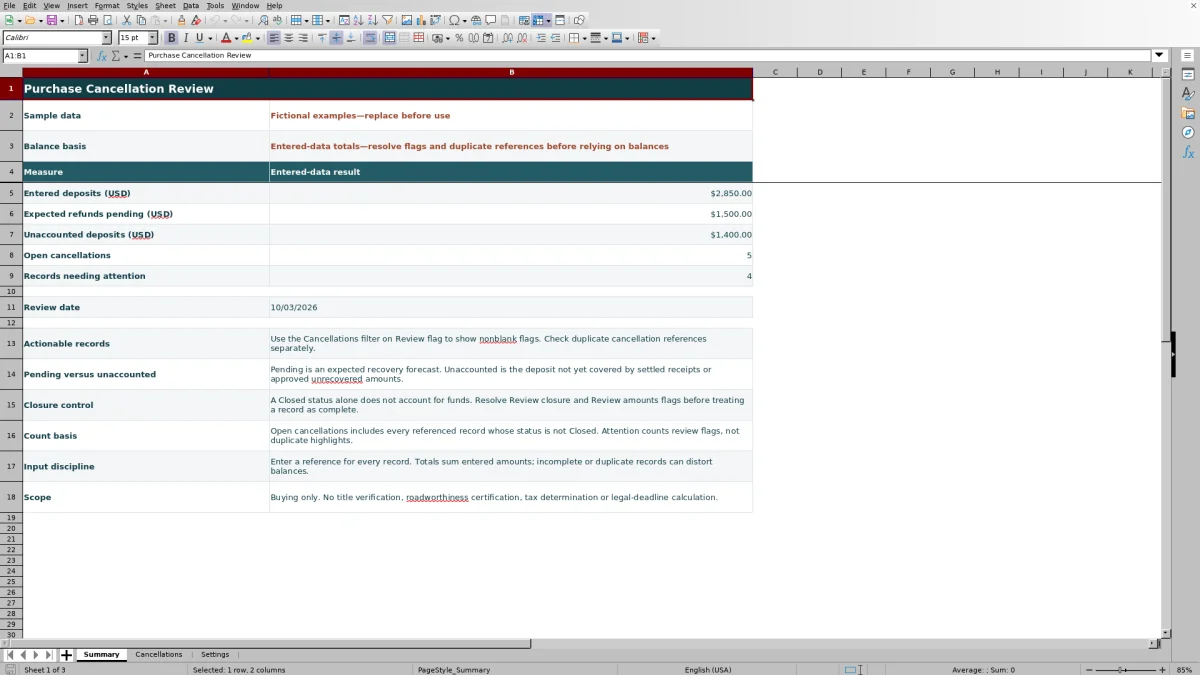
Summary brings together entered deposits, expected refunds pending and unaccounted deposits across Cancellations rows 2–101. These figures help you decide where to investigate, but they do not confirm bank activity or a supplier's refund obligation.
Open cancellations counts every row with a Cancellation reference whose status is not Closed. A referenced row with a blank status therefore still counts as open. Records needing attention counts nonblank Review flag results, not every underlying issue and not duplicate-reference highlights.
Keep the fixed 100-record range in mind. The supplied formulas and summary ranges cover rows 2–101. Do not assume records entered below row 101 will be included; any extension needs the formulas, validation and summary references checked. Within the supplied range, incomplete and duplicate records can still distort totals, so review the detail before reporting a balance.
Keep the tracker within the buying task
The record boundary is one abandoned acquisition agreement per row, not one retail vehicle record. Stock reference and Supplier alias help you identify the agreement; they do not establish connections to an inventory system or supplier account.
Use the tracker to record your administrative position, while keeping the agreement, cancellation correspondence, receipt evidence and approval records separately. It does not determine whether a deposit is legally refundable, verify title, certify roadworthiness, determine taxes or calculate legal deadlines.
This is not a retail stock register, prep-management file, sales tracker or consumer lending tool. It also does not make payments, submit registrations, value vehicles or synchronize with external records. If an unresolved cancellation requires those tasks, handle them through the appropriate separate process.
Comparison: this workbook or a blank spreadsheet
This workbook suits a buying team that wants a defined cancellation register with existing calculations and review checks. A blank spreadsheet is a realistic alternative when your record structure needs to differ substantially and you are prepared to define and check it yourself.
| Method | Starting structure | Balance review | Follow-up | Maintenance |
|---|---|---|---|---|
| Car Dealer Sheets workbook | Three sheets with cancellation inputs, settings and summary | Two calculated balances and selected consistency flags | Next action, target date and overdue check against the review date | Manual updates; supplied ranges cover 100 records |
| Blank spreadsheet | You define the fields and layout | You create and check any formulas and controls | You design the action list and date checks | You maintain the structure and reporting ranges you build |
Choose this workbook when its buying-only scope and entered-data checks fit your process. Start from a blank spreadsheet when you need a different structure. If you need connected payment records, messaging or broader dealership workflows, evaluate specialized dealer management software against those requirements rather than assuming this tracker supplies them.
Frequently asked questions
Can I track a cancellation when no deposit was paid?
Yes. Enter 0 in Deposit paid (USD) and Expected total refund (USD) when neither applies. Complete the other required fields and record a next action and target date while the cancellation remains open. A zero-dollar record can still require administrative follow-up.
How should I enter several partial refunds?
Update Settled refunds received (USD) with the cumulative confirmed receipts for that agreement. Keep the individual receipt details separately; the supplied row has one settled-refund amount field, not a transaction-by-transaction receipt ledger. Expected total refund (USD) is the total recovery you expect, not just the remaining installment.
Can I rename the status choices?
Retain Open, Waiting for refund and Closed exactly as supplied. The editable choices on Settings feed the dropdown, and the formulas depend on Closed. Changing that label can affect open counts and closure checks.
Does a blank Review flag mean the cancellation is finished?
No. A complete open record with a future target can have no flag. A row without a Cancellation reference also has no flag, and duplicate highlights are separate. Check the reference, status, balances and supporting records rather than using the absence of a flag as a completion test.
Will the workbook confirm that a supplier has issued a refund?
No. You confirm settled receipts and enter them manually. A supplier's promise belongs in your recovery expectation until you have confirmed receipt; the workbook has no payment processing or live synchronization.
Editorial areas

Owen AshfordVehicle stock & purchasing
About this editorial area →
Mara WestbrookSales records & delivery
About this editorial area →