Before pursuing a used-car purchase, record the listings you compared and explain how they differ from your target vehicle. This Excel workbook from Car Dealer Sheets organizes dated asking-price observations and your adjustments so you can review the evidence behind a buying decision.
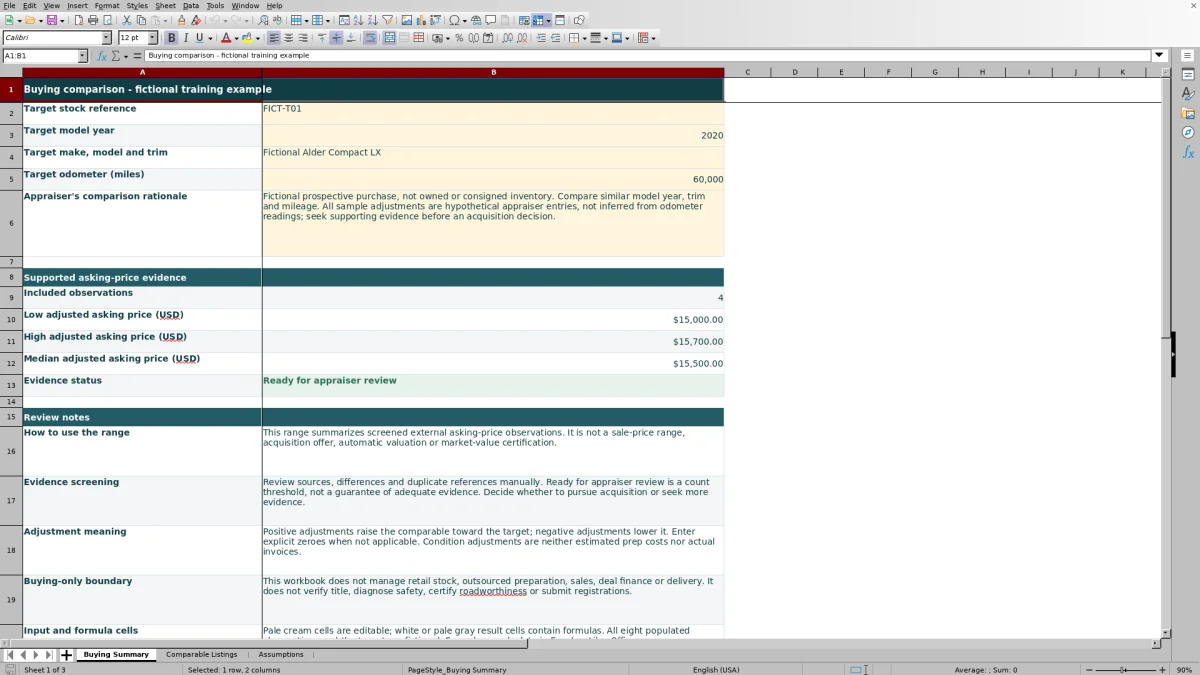
The used car comparable listing worksheet summarizes included observations as a low, high and median adjusted asking price. It documents asking-price evidence, not certified market value. The target vehicle and all eight populated observations are fictional training examples that you should replace before using the file for a real comparison.
When to use this workbook
- Keep source references, observation dates and comparison reasoning together for later checking.
- See how your entered adjustments change each comparable's asking price.
- Identify incomplete or out-of-window observations before relying on the summary.
- Use the included price range to decide whether you need more evidence before pursuing a purchase.
What is in the file
How to use the workbook
1. Identify the vehicle you are considering
On Buying Summary, replace the fictional target stock reference, model year, make, model and trim, and odometer reading in miles. Use Appraiser's comparison rationale to explain which similarities and differences matter for this purchase. The target describes a prospective purchase; recording it here does not establish owned inventory.
2. Set the review assumptions
On Assumptions, enter Review date, Lookback period (days) and Minimum included observations. Keep all three populated. Dates display as MM/DD/YYYY. Check the calculated inclusive start and end dates before entering evidence; these settings are your operational choices, not prescribed standards.
3. Replace the training listings with your observations
On Comparable Listings, replace or clear the fictional inputs in rows 2–9, then use the prepared input area through row 101. Enter one dated external asking-price observation per row, including its source reference, vehicle details and asking price in USD. Edit the pale cream input cells and preserve the formulas in columns N:P.
4. Explain adjustments and resolve row statuses
Enter all four adjustment amounts in USD, using an explicit zero where an adjustment does not apply. Record your reasoning in Differences and adjustment rationale, then select Yes or No in Use observation?. Read Review status and resolve gaps, date issues or price issues. Review duplicate references manually before relying on an included row.
5. Review the screened range
Return to Buying Summary to check Included observations, the low, high and median adjusted asking prices, and Evidence status. Compare those results with the underlying listings and your rationale. Decide whether the evidence warrants further acquisition discussion or whether you need more comparable observations.
Choose observations that support a meaningful comparison
Start with the target vehicle rather than collecting every available listing. Consider whether each vehicle's model year, trim, mileage and other known differences make it useful for your comparison. Record the reasoning, including any material uncertainty, instead of treating a matching model name as sufficient evidence.
Each row represents one dated external asking-price observation. Use Observation reference to identify the entry and Source description/reference to record enough detail to find or check the source again. The source field is plain text: it does not retrieve listings, refresh prices or synchronize with another system.
A repeated observation reference receives a visual warning, but the workbook does not deduplicate records. The same vehicle could also appear under different references without that warning. Check repeated vehicles and sources yourself so multiple advertisements do not unintentionally give one vehicle extra weight in the median. Set Use observation? to No for entries you decide to leave out and explain that choice in the rationale.
Practical example: interpret an adjusted asking price
The adjusted asking price is the observed asking price plus your mileage, condition, equipment and other adjustments. Positive adjustments raise the comparable toward the target; negative adjustments lower it. You supply every amount. The workbook does not infer an adjustment from the target's mileage, a condition description or an equipment difference.
In row 2, the calculation uses the sum of G2:K2. It returns a result only when the asking price and all four adjustments are numeric, the asking price is greater than zero, and the combined amount is greater than zero. Enter zero for an adjustment you have considered and judged not applicable; a blank adjustment prevents the price calculation.
For a fictional example from the supplied training data, an asking price of $15,000.00 USD plus a hypothetical mileage adjustment of $500.00 USD and three zero adjustments produces $15,500.00 USD. That result represents the asking price after the entered adjustment—not a verified value or a recommended offer. Before using a comparable like this, check whether you can support the $500.00 adjustment and document why it is appropriate. The sample amount is not an adjustment rate to reuse.
Set the date window and evidence threshold deliberately
The date window starts at Review date minus Lookback period (days) and ends on Review date. Both endpoints are included. With the fictional initial settings of 10/03/2026 and 30 days, observations dated 09/03/2026 through 10/03/2026 are within the window. An earlier observation or one dated after the review date is outside it.
Choose a review date that matches the comparison you are documenting. If useful listings fall outside the window, decide whether to gather more recent observations or revise the lookback period for a stated reason. Do not change an observation's date merely to make it qualify. Changing the assumptions can change which prices reach the summary.
Minimum included observations controls the summary's count threshold. With the initial setting of three, one or two included observations produce Limited sample; three or more produce Ready for appraiser review. That phrase is a count signal, not proof of adequate evidence and does not mean anyone has reviewed the file. Even a larger sample can contain weak comparisons or repeated vehicles.
Read the range before making a buying decision
Buying Summary draws its statistics only from Included adjusted asking price (USD) in Comparable Listings. A row can display an adjusted asking price in column N without contributing to the summary: it must also have an Included status, which passes its price to column P.
With the initial settings, the eight fictional observations yield four included prices. The low is $15,000.00 USD, the high is $15,700.00 USD and the median is $15,500.00 USD. The low and high are the endpoints of the screened adjusted observations. The median is their middle value, averaging the two middle values when the count is even; it is not the arithmetic average of every included price.
Use the range as a prompt to inspect the evidence. A high or low endpoint may reflect a meaningful vehicle difference, an unsupported adjustment or a weak source. Open the relevant rows and check the reasoning before deciding whether to pursue the purchase or collect more evidence. None of these figures establishes an agreed sale price or an acquisition offer.
Errors and solutions for missing results and review warnings
Read the text in Review status first. Amber or gray row coloring is a visual aid, not a separate decision. The screening order matters: a No selection produces Excluded before other checks, and missing required entries are flagged before the date window or price checks.
- Incomplete: Check the observation reference, date, source, vehicle description, model year, miles, asking price, four adjustments, rationale and Yes/No selection. Dates, year, miles and amounts must be numeric where required. A blank adjustment is not treated as zero.
- Outside date window: Compare Observation date with the inclusive start and end dates on Assumptions. Correct an entry error or reconsider the review settings based on your actual evidence needs.
- Check adjusted price: Review the asking price and signed adjustments. An asking price of zero or less, or a combined adjusted price of zero or less, cannot qualify. Do not insert a token positive amount just to remove the warning.
- Excluded: The row is marked No in Use observation?. Change it to Yes only if you intend to reconsider it; the remaining checks still apply.
- Duplicate-reference warning: Check whether the record is repeated or the reference was reused. Resolve the entry or exclude it as appropriate; the warning itself does not remove it from the summary.
If no observations qualify, Buying Summary shows a count of zero, blank low/high/median results and No included observations. Those blanks do not mean the vehicle has a zero-dollar value. Resolve the underlying rows or collect suitable evidence before interpreting a range.
Keep asking-price evidence separate from acquisition costs
This workbook supports a buying comparison, not the full economics or administration of a purchase. A condition adjustment is not a prep estimate or an invoice. It changes how you compare an external asking price with the target; it does not record the work the target needs or what that work will cost.
Before deciding what you can offer, assess acquisition costs, expected prep and other relevant charges separately. The workbook does not calculate an offer, profit margin, expected funds or settled receipts. Its comparison range should be one input to your decision, not a substitute for those records.
Keep vehicle verification separate as well. The file does not verify title, diagnose safety or certify roadworthiness. It also does not manage retail stock, prep work, sales, deal finance or handover. Use separate records or systems for those tasks rather than extending the meaning of the comparison summary.
Compare this workbook with a blank spreadsheet
Choose the recording method according to the task you need to complete. This workbook provides a defined structure for one target vehicle and its asking-price observations. A blank spreadsheet gives you freedom to design a different evidence record, but you must set up and check any calculations or screening rules you want.
| Method | Setup and structure | Calculations and screening | Practical fit and limits |
|---|---|---|---|
| Car Dealer Sheets comparison workbook | Target summary, assumptions and 100 prepared observation rows | Entered-price adjustments, required-entry and date checks, and low/high/median summary | Fits a defined asking-price comparison; source quality, comparability and adjustment support remain manual decisions |
| Blank spreadsheet | You choose the fields, layout and observation capacity | You create and check formulas, inclusion rules and summaries | Fits a custom evidence process; no comparison structure or checks exist until you build them |
Use this workbook when its target-and-observation structure matches your buying review. Start with a blank spreadsheet when you need a materially different evidence model and are prepared to maintain it. Neither method verifies a listing or converts asking prices into completed-sale evidence merely by recording them.
Frequently asked questions
Does the workbook pull live listings or update asking prices?
No. You enter dated observations manually, and source references are plain text. There are no listing feeds, external links or synchronization. Check the source again when you need a fresh observation rather than assuming the recorded price is still current.
How many observations can I enter?
Comparable Listings has 100 prepared observation rows, from row 2 through row 101. Rows 2–9 contain fictional examples. The prepared formulas, validation and filter range cover that area, and the summary reads through row 101. Entries below it are not included by the existing summary formulas.
Can I compare several target vehicles in the same file?
The workbook has one target area on Buying Summary and one shared observation summary. It does not provide separate calculated ranges by target stock number. Keep a separate copy for each target if you need to maintain distinct comparisons without mixing their evidence.
Will changing the target mileage recalculate the mileage adjustments?
No. Target mileage records the vehicle you are considering; it does not drive the adjustment amounts. If you change the target, reconsider the comparables and manually review every adjustment and rationale before using the resulting range.
Does filtering the listing sheet change the summary?
No. The summary formulas use the included prices across rows 2–101, not just the rows currently visible through the filter. To leave an observation out of the calculated range, set Use observation? to No rather than merely hiding it with a filter.
Editorial areas

Owen AshfordVehicle stock & purchasing
About this editorial area →
Mara WestbrookSales records & delivery
About this editorial area →