When you are deciding whether to keep an owned car for retail or release it through wholesale, compare what each route could return from today forward. This Car Dealer Sheets Excel workbook subtracts remaining retail costs and estimated holding costs from your expected retail sale price, then compares the result with the immediate wholesale net proceeds you enter.
Use the comparison to review the assumptions and record your selected route. It is an incremental stock exit comparison, not a vehicle valuation or profit calculation, and its suggestions depend on the figures and dates you supply.
When to use this workbook
- Compare retail and wholesale on a remaining-cost basis rather than relying on the asking price alone.
- See how your expected wait for retail proceeds affects the amount you could recover.
- Identify incomplete or out-of-date inputs before relying on a calculated suggestion.
- Keep your selected exit route and decision note beside the assumptions used for that car.
What is in the file
How to use the workbook
1. Set the review assumptions
On Settings, edit B2–B5: Daily holding cost (USD/day), Decision review band (USD), Review date and Maximum estimate age (days). Use assumptions appropriate to your review. The supplied $20 daily cost, $500 band and seven-day age limit are editable planning values, not industry standards. Update the review date manually; it does not advance automatically.
2. Replace the fictional records
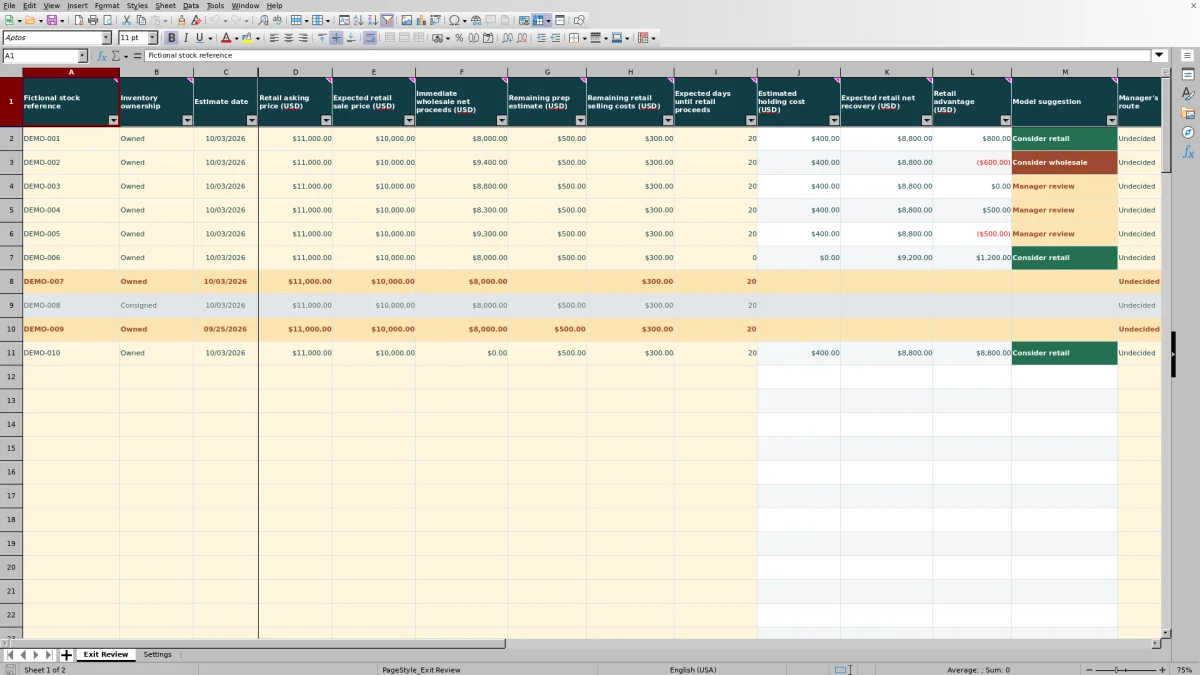
Exit Review rows 2–11 contain fictional examples. Replace them before operational use. Enter your stock number under Fictional stock reference and use one row per vehicle within rows 2–101. Complete the ownership, estimate date, expected proceeds, remaining costs and expected days in columns A–I. Dates display as MM/DD/YYYY and monetary amounts are in USD.
3. Check input status before reading the result
Read Input status in column P. Resolve Incomplete or Refresh inputs before using the comparison; Consigned stock is Outside scope. When a row is Ready, review Estimated holding cost (USD), Expected retail net recovery (USD), Retail advantage (USD) and Model suggestion. Leave formulas in J–M and P intact; these cells are visually distinct but are not sheet-protected.
4. Record your decision
Choose Undecided, Retail or Wholesale in Manager's selected route, then explain the reason in Decision note. Your selection is separate from the model suggestion. When estimates change, update that vehicle's existing record rather than adding another current comparison for the same stock number.
Put retail and wholesale figures on a comparable basis
Enter the amount you realistically expect to receive in Expected retail sale price (USD), not simply your advertised asking price. The calculation subtracts Remaining prep estimate (USD), Remaining retail selling costs (USD) and estimated holding cost. That gives the expected retail recovery available for comparison with wholesale.
Wholesale must already be net. Immediate wholesale net proceeds (USD) is used directly; the formula does not deduct separate wholesale fees or transport charges. Account for any applicable deductions when preparing that input. Likewise, avoid counting the same retail expense in both remaining selling costs and the daily holding-cost assumption.
Use Expected days until retail proceeds to reflect the expected wait for the money, not just the time until a deal is agreed. The workbook applies one daily holding-cost rate from Settings to every Ready record, so check whether that shared assumption is suitable for the cars under review.
Fictional example: interpret the retail advantage
The supplied fictional DEMO-001 record uses an expected retail sale price of $10,000, immediate wholesale net proceeds of $8,000, $500 of remaining prep, $300 of remaining retail selling costs and 20 days until retail proceeds. With the supplied $20-per-day holding-cost assumption, estimated holding cost is 20 × $20 = $400.
Expected retail net recovery is $10,000 − $500 − $300 − $400 = $8,800. Subtracting the $8,000 wholesale net proceeds gives a $800 retail advantage. With the supplied $500 review band and a Ready input status, the model returns Consider retail.
This means retail is expected to recover $800 more under those assumptions—not that the car will earn $800 in profit. Before retaining it, check the expected sale price, the remaining prep and the 20-day wait. The example's $11,000 asking price does not enter the calculation.
Use the review band without treating it as an instruction
The Decision review band (USD) defines how large the calculated difference must be before the model suggests a route. With a $500 band, a retail advantage greater than $500 produces Consider retail. An advantage below −$500 produces Consider wholesale. Values from −$500 through $500, including both boundaries, produce Manager review.
The band is a decision threshold, not a statistical confidence range. You still need to judge the reliability of the estimates. In the fictional example above, extending the wait from 20 to 40 days at $20 per day raises holding cost from $400 to $800. Retail net recovery falls to $8,400, and the $400 retail advantage moves the suggestion to Manager review.
The selected route remains your choice. If access to funds or uncertainty about the retail estimate leads you to choose a different route, record that reason in Decision note. Changing Manager's selected route does not change the calculation.
Keep estimate dates meaningful
Freshness is measured against Review date in Settings, not an automatically advancing date. Update it each time you conduct a new review. Maximum estimate age (days) controls how old an estimate may be while remaining eligible for calculation.
For example, with a review date of 10/10/2026 and a seven-day maximum age, an estimate dated 10/03/2026 remains eligible. An estimate dated 10/02/2026 is too old, and one dated 10/11/2026 is future-dated; both produce Refresh inputs if the other required inputs are complete.
Refresh the figures, not just the date. Recheck the proceeds, remaining costs and expected timing before updating Estimate date. One date covers the row; the workbook does not independently confirm when each underlying estimate was obtained.
Errors and solutions for missing results and misleading entries
- Blank results are not zero recovery. A blank stock reference leaves Input status blank. Other rows that are not Ready also leave the calculated comparison blank. Check column P before interpreting empty output cells.
- For Incomplete, confirm Inventory ownership is Owned, Estimate date is a numeric spreadsheet date, all five inputs in E–I are numeric, and Settings B2–B5 contain numeric values. An amount stored as text can fail these checks.
- For Refresh inputs, compare Estimate date with the manually entered Review date and the permitted age. Reassess the estimates before dating them again.
- For Outside scope, confirm whether the vehicle is consigned. Do not relabel it Owned merely to obtain a result; consigned disposal needs a separate authorization process.
- If a result no longer calculates after editing, check whether a formula in J–M or P was overwritten. The workbook does not protect those formulas from editing.
A Ready status indicates that the formula's input checks passed. It does not verify the accuracy of the entered prices, costs or expected timing.
Know what the comparison leaves out
The workbook compares expected retail recovery after the specified remaining costs with immediate wholesale net proceeds. It does not subtract acquisition cost or costs already incurred, so neither Expected retail net recovery (USD) nor Retail advantage (USD) is a complete deal-profit figure. Use your cost records separately when you need that view.
The scope is owned retail stock, with one current comparison per vehicle. Consigned vehicles are excluded. Prepared rows run from 2 through 101, giving a capacity of 100 records; row 102 is outside that prepared capacity.
The two sheets provide a current decision worksheet, not a transaction or payment record. A model suggestion does not confirm a wholesale offer, a completed deal or settled funds. Keep the supporting estimates and any decision records you need separately from the current comparison.
Compare the workbook with a blank spreadsheet or paper log
Choose your method based on how repeatable the comparison needs to be and how much setup you want to maintain. This workbook supplies a defined remaining-cost model. A blank spreadsheet offers a starting point for a different model, while a paper log supports a manually calculated review.
| Method | Calculation setup | Input review | Decision record | Best fit |
|---|---|---|---|---|
| Car Dealer Sheets workbook | Prepared retail recovery and wholesale comparison for 100 records | Formula checks for required inputs, ownership and estimate age | Selected route and note beside each current comparison | Owned stock reviewed using the supplied incremental model |
| Blank spreadsheet | You design and check the formulas | You build any completeness or date checks needed | You design the fields and record layout | A different cost model or record structure that you are prepared to maintain |
| Paper log | You calculate and write each comparison manually | You check dates and missing figures yourself | Written route and supporting notes | Occasional reviews where manual calculation is acceptable |
Use this workbook when its owned-stock scope, shared holding-cost rate and 100-record capacity match your task. If you need a broader dealership system, assess specialized dealer management software against your actual requirements; this worksheet should not be treated as a substitute for functions it does not provide.
Frequently asked questions
Does changing the asking price change the suggestion?
No. Retail asking price (USD) is recorded for reference but is not used in the calculation or the readiness check. Expected retail sale price (USD) drives retail recovery. Revise that expected amount only when your assessment of the likely sale proceeds changes.
Can I enter zero when no remaining prep is needed?
Yes. A numeric zero in Remaining prep estimate (USD) counts as a completed numeric input. Use zero when you have assessed that no further prep cost remains, not as a substitute for an unknown estimate. A blank required cost input leaves the row Incomplete.
Will changing Settings affect just the car I am reviewing?
No. The calculation formulas refer to the same Settings cells for every prepared record. Changing the holding-cost rate or review band can change multiple suggestions. Changing the review date or maximum estimate age can also change which rows are Ready. Review the affected records after changing a shared assumption.
Can I leave the selected route as Undecided?
Yes. Undecided is a permitted value in Manager's selected route. That field is not part of the readiness check, so a complete, current row can display a model suggestion while your decision remains open. Use Decision note to record what you still need to resolve.
Does the wholesale proceeds field retrieve an offer?
No. Immediate wholesale net proceeds (USD) is a manually entered input. The workbook's calculation uses that amount; it does not establish an offer or verify payment. Confirm the amount and its deductions through your own supporting records before relying on the comparison.
Editorial areas

Owen AshfordVehicle stock & purchasing
About this editorial area →
Mara WestbrookSales records & delivery
About this editorial area →