Before questioning an offsite storage bill, check which charges are supported by your custody confirmations. This Car Dealer Sheets Excel workbook compares manually entered invoice lines with recorded stay dates and approved daily rates for owned or consigned retail stock.
Use it to identify dates and amounts that need follow-up, then check the source documents before contacting the storage provider. The workbook matches stay and stock references; it does not verify vehicle identification numbers (VINs), obtain confirmations, or decide whether a disputed charge must be credited.
When to use this workbook
- Focus your review on billed dates outside the recorded custody window.
- Calculate storage differences from documented daily rates rather than estimating a disputed amount.
- Find missing or conflicting references before relying on the financial results.
- Keep invoice-line and stay references together when preparing supplier questions.
What is in the file
How to use the workbook
1. Set the billing assumptions
In Controls, check Day-count adjustment and Review tolerance (USD). Set the day-count adjustment to 1 to include both dates or 0 to exclude the end date, according to the billing terms you are checking. The supplied values are example settings, not prescribed billing rules.
2. Enter the confirmed stays
In Custody, replace the fictional examples with your records in columns A–G. Give each stay a unique Stay reference, record the Stock reference, ownership and storage site, and enter the confirmed dates and documented daily rate. Use whole dates in MM/DD/YYYY and nonnegative numeric USD rates. Keep supporting documents separately under the stay reference.
3. Enter storage-only invoice lines
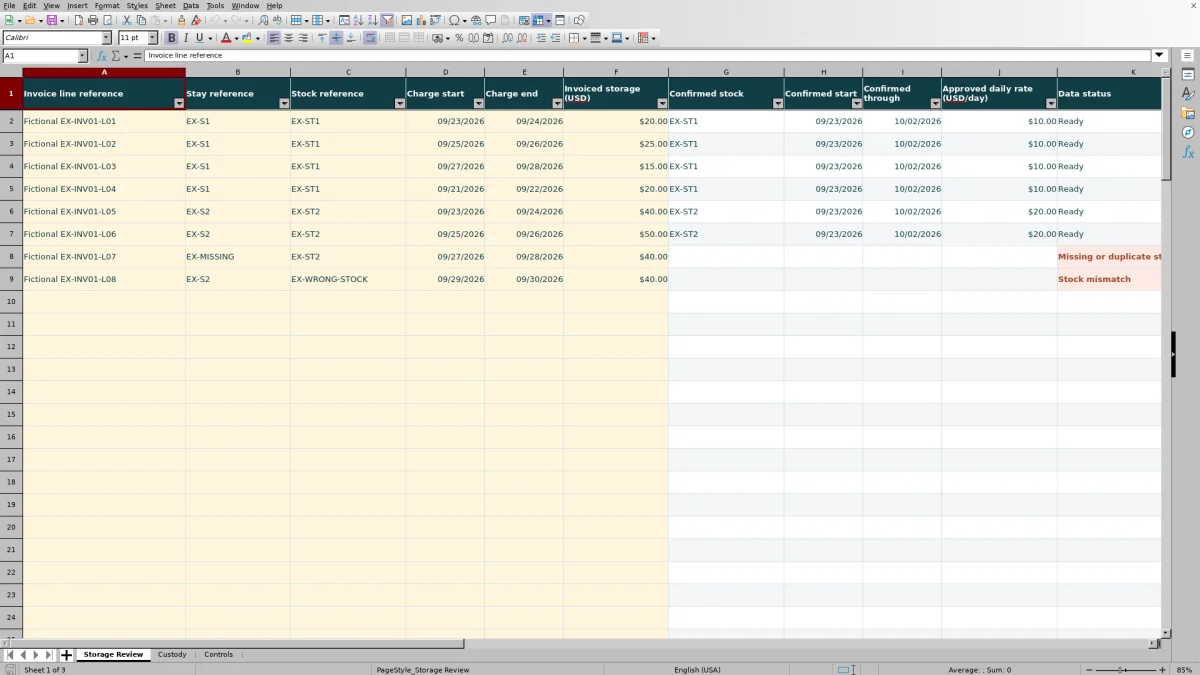
In Storage Review, enter your invoice details in columns A–F. Use one row per vehicle, stay and date range, with the invoice number included in a unique Invoice line reference. Separate fees and taxes before entering Invoiced storage (USD). Use the same stay and stock references as the corresponding custody record.
4. Recalculate and resolve blocked records
Have Excel recalculate the formulas, then check Data status before reading the amounts. Edit inputs, not calculated outputs. Formula cells are not locked: Storage Review columns G–O and Custody column H contain calculations. Replace or clear the fictional input records without deleting those formulas.
5. Review exceptions against the documents
Filter Review result in Storage Review to inspect Outside confirmation and Review amount lines. Check the separate Blocked lines count in Controls before using the totals. For each proposed supplier query, retain the invoice line, custody confirmation and rate evidence outside the workbook.
Link each bill to the right vehicle and stay
Start with the identity of the stay, not just the vehicle. A car can return to the same storage site or move between sites, so use a distinct Stay reference for each separately documented stay. Several invoice lines can refer to that same custody record, but each Invoice line reference must remain unique.
The workbook has Stock reference fields, not a dedicated VIN field or VIN validation. If the supplier identifies cars by VIN while you use stock numbers, verify that mapping in your stock records and supporting documents before entering the corresponding references. The fictional EX-ST identifiers supplied in the file are stock identifiers, not VINs.
A stock-reference mismatch blocks financial outputs, but matching references do not establish that the underlying vehicle details are correct. Check the source invoice and custody confirmation rather than changing a reference merely to make the row calculate.
Choose how dates become billable days
Supported days measures the overlap between the invoice date range and the recorded custody window. It takes the earlier end date, subtracts the later start date, adds the Day-count adjustment from Controls!B2, and never returns less than zero. Supported charge (USD) then multiplies those days by the Approved daily rate (USD/day) and rounds the result to two decimal places.
The date convention changes the charge. For a fully supported period from 09/23/2026 through 09/24/2026, adjustment 1 produces two days; adjustment 0 produces one day. At a fictional rate of USD 10.00 per day, those conventions produce USD 20.00 and USD 10.00 respectively. Check the agreed billing convention before choosing the setting.
Both the day-count setting and the review tolerance apply across the workbook. Do not combine invoices requiring different date conventions in one review without separating the work appropriately. Enter whole dates, not timestamps; the calculation is not an hourly storage model.
Review tolerance (USD), in Controls!B3, controls the amount flag. An absolute difference greater than the tolerance triggers Review amount when the dates are fully supported. A difference exactly equal to the tolerance remains Matched.
Fictional example: distinguish a rate issue from a date issue
In the supplied fictional records, stay EX-S1 covers stock EX-ST1 from 09/23/2026 through 10/02/2026 at USD 10.00 per day. With Day-count adjustment set to 1 and Review tolerance (USD) set to 0.01, an invoice line for 09/25/2026 through 09/26/2026 charging USD 25.00 has two supported days.
Two days at USD 10.00 produce a supported charge of USD 20.00. The difference is USD 25.00 minus USD 20.00, or USD 5.00 above the recorded support. Because the dates are within confirmation and the difference exceeds USD 0.01, the formula produces Review amount. Your next step is to check the approved rate and whether a non-storage fee was included before asking the supplier about the USD 5.00.
A separate fictional line for 09/21/2026 through 09/22/2026 charges USD 20.00 against the same stay. Neither day overlaps the recorded confirmation, so supported days and supported charge are zero. The result is Outside confirmation. That means you need evidence covering those earlier dates or an explanation from the supplier; it does not prove the car was absent from storage.
Read line results before relying on the net total
Review result checks date coverage before the amount difference. Outside confirmation therefore takes precedence over Review amount, even when both the dates and the money need attention. Inspect Difference (USD) on those lines as well as the date window.
- Matched means the date range is supported and the amount agrees within your tolerance. It is not payment approval.
- Review amount means the fully supported line has an absolute amount difference above the tolerance.
- Outside confirmation means the supported day count is smaller than the billed day count under the selected convention.
Difference (USD) equals invoiced storage minus the supported charge. A positive value suggests a potential overcharge against the entered evidence. A negative value means the invoice is below the calculated support; investigate the reason rather than treating it automatically as an error.
Controls shows Ready invoiced (USD), Supported charges (USD), Net difference (USD) and Blocked lines. Ready does not mean approved. These totals include calculable exception lines, while blocked lines are excluded from the financial totals. Positive and negative differences can offset in the net figure, so use individual invoice lines—not the net total alone—to prepare a dispute.
Errors and solutions for blocked storage records
When an invoice row is blocked, its blank financial outputs are not zero charges. Resolve the input issue first so that the row can contribute to the review.
- Incomplete: complete the invoice references, charge dates and numeric invoiced amount. Check that dates and amounts are stored as numbers rather than text.
- Invalid inputs: correct an end date earlier than its start date or a negative invoiced amount.
- Duplicate line: check for a repeated invoice entry. If the rows are genuinely different lines, use their distinct source line references; do not rename an accidental duplicate just to clear the warning.
- Missing or duplicate stay: make sure the invoice Stay reference appears exactly once in Custody.
- Incomplete custody: complete the custody record, including stock ownership, site, dates and rate. Also check the date order, nonnegative rate and uniqueness of the stay reference.
- Stock mismatch: verify the vehicle mapping in the supporting records and correct the erroneous reference.
After making corrections, recalculate and review the result again. A zero supported charge on a Ready row has a different meaning from a blank blocked result: it can arise from no supported days or a recorded zero daily rate. Check which input caused it before acting.
Build a supplier query the calculation can support
For each questioned line, assemble the invoice number and line reference, vehicle reference, storage site, billed dates, confirmed dates, approved daily rate and calculated difference. Keep the original invoice, custody confirmation and rate evidence alongside your review copy, organized by stay reference. The workbook records entered facts and calculates differences; it does not obtain or authenticate those documents.
Check overlapping invoice periods manually. Unique line references do not establish that the same dates were billed only once. Two different invoice lines for the same stay can both calculate successfully while charging for overlapping days. Compare their date ranges, including lines on different invoices, before accepting them.
Supported charge covers only the overlap with the recorded confirmation window. If the yard's confirmation is incomplete, obtain the missing evidence before concluding that the uncovered dates should be removed. The file handles storage-only daily-rate amounts, not taxes, other fees or legal entitlement to a credit.
Send supplier questions and track responses separately. No supplier messaging or integration is provided, and a workbook result is not a substitute for the agreed billing terms or evidence.
Compare this workbook with a blank spreadsheet
Choose according to the calculation you need and the setup you are prepared to maintain. This workbook provides a defined storage-reconciliation structure. A blank spreadsheet gives you an open layout, but you must design and check the matching rules yourself.
| Method | Initial setup | Calculation approach | Review limits | Suitable use |
|---|---|---|---|---|
| Car Dealer Sheets workbook | Enter custody records, invoice lines and shared control settings. | Prepared stay lookups, date-overlap charges, differences and review results. | 100 prepared rows per record sheet; manual document checks and overlapping-bill review remain necessary. | Storage-only checks using one documented daily rate per stay record and a shared date convention. |
| Blank spreadsheet | Create your own fields, references, formulas and review rules. | Manual calculations or formulas you build and verify. | No prepared reconciliation checks until you create them. | A custom billing layout when you can design and maintain the required logic. |
Use the prepared workbook when its daily-rate and date-window model fits the bill. Consider a custom approach if the invoice requires calculations outside that model. Neither approach removes the need to check the source documents or explain a proposed adjustment to the supplier.
Frequently asked questions
Can I use this for both owned and consigned stock?
Yes. Stock ownership in Custody offers Owned and Consigned. That classification records the stock category; it does not determine who is responsible for the storage bill or verify legal ownership. Check the relevant agreement separately.
What if the car is still at the storage site?
Use Confirmed through to record the latest date supported by a custody confirmation. The workbook requires a closed date window for its calculation, but that date does not have to represent a physical release. Update it when you receive further evidence rather than assuming ongoing custody is confirmed automatically.
How should I handle a daily rate that changes during a stay?
Each custody row holds one approved daily rate. If the documented rate changes, represent the relevant periods as separate, uniquely referenced records and split the invoice review accordingly. Check the period boundaries against your day-count convention so that you do not include the same day twice or leave an unintended gap. The workbook does not calculate a changing rate within one custody record.
Can I add records below row 101?
The prepared formulas, filters, validations and matching ranges cover rows 2–101. Do not assume a row entered below that range is included in calculations or totals. Use a separate review copy for another batch, or have the ranges and formulas deliberately extended and checked before relying on them.
Are the prefilled amounts my starting balances?
No. The two EX-S stays and eight Fictional EX-INV01 invoice lines are fictional examples. Controls also contains a fixed fictional example date and notes describing initial example totals; those notes are not live balances. Replace the example inputs, recalculate the formulas and check results against your own documents before using the workbook operationally.
Editorial areas

Owen AshfordVehicle stock & purchasing
About this editorial area →
Mara WestbrookSales records & delivery
About this editorial area →